- 28
- October
"What Is Claude Academy? Anthropic's Free Learning Site, and the 'Claude in Academy' Setting Team Admins Have to Switch On: What It Does and How Usage Is Counted (October 2026)" — the short answer is Claude Academy is Anthropic's free learning site at academy.claude.com, launched 20 August 2026, and "Claude in Academy" is a setting in the Team/Enterprise admin console that an Owner has to switch on before members can ask Claude questions inside lessons, have it draw diagrams, or quiz them on a passage. This article walks through the course catalogue, what the setting unlocks, how usage and seats are counted, where the questions go, what Org reports show admins, and a checklist to run before opening it to the whole organisation.
In one line: Claude Academy = Anthropic's free learning site (27 courses, free badges) · the Claude in Academy setting is switched on by a Primary Owner/Owner under Admin settings → Products → Claude Academy · it lets members ask Claude inside lessons, turn passages into diagrams and quiz themselves · no separate charge, no seats consumed, questions count like chat messages · questions are not saved to history, not used for training, and admins cannot read them.
Before you read: Checked on 28 October 2026 against the FAQ, course catalogue and connector pages on academy.claude.com, the launch article on claude.com (20 August 2026), and the admin console of the Team plan our own company uses. The switch in that console still carries a beta label, so menu names and wording may change in later releases.
1. What Claude Academy is and where it came from
Claude Academy is Anthropic's learning site at academy.claude.com. It opened on 20 August 2026 and replaced the earlier "Anthropic Academy", which lived on the Skilljar platform. Everything on it is free. You can browse without signing in. If you want your progress saved and a completion badge when you finish a course, sign in with a Claude account. A free personal account is enough. You do not need a paid plan or a work account.
Content comes in three shapes: courses (several lessons plus quizzes), short tutorials of 4 to 20 minutes, and use cases you work through with Claude. It covers five products: Claude on the web and in the apps, Claude Cowork, Claude Code, Claude Tag (Claude in Slack) and the Claude Platform for developers. There is also an AI Fluency track that is not tied to any product and teaches how to think when working with AI.
You reach it two ways: type academy.claude.com, or open the profile menu in Claude and choose "Learn more". Signing in is a one-time authorisation at claude.ai. Academy then binds itself to the account and the organisation you were signed in with at that moment. That detail matters to admins, and section 6 comes back to it.
| Item | Detail (checked 28 Oct 2026) |
|---|---|
| Launch | 20 August 2026, per the announcement article on claude.com |
| Former name | Anthropic Academy on Skilljar. Old progress does not move over automatically. If your Skilljar email matches your Claude account, a banner offers to import it (rolling out gradually). If the emails differ, create a Claude account with that email or re-earn the badge. Partner-programme learners stay on Skilljar. |
| Cost | Free. No paid plan and no work account required. |
| Sign-in | Not needed to read. Needed to save progress and earn badges, using a Claude account. |
| Volume | 27 courses on the catalogue page. The Claude product section alone lists 70 use cases and 67 tutorials. |
| Credential | Completion badge: free, never expires, downloadable as PDF, addable to LinkedIn, shareable through a public verification link. Issued when you pass every quiz. Unlimited retakes. Not the same thing as the paid, proctored certification exams. |
| Language | Core content is English. Some pages are translated, but the connector searches English pages only. |
| One message when you earn a badge. No newsletter. |
Using Claude at work? Get a quote in Thai Baht with a full tax invoice
A short form — you get a request number by email right away, and our sales team follows up using that number · one form for Team and Enterprise
2. What courses exist and how long they take
The catalogue groups courses into four sets. Lesson counts and durations are Anthropic's estimates from the course pages. Finishing faster still earns the badge, because completion is based on passing quizzes, not on time spent.
| Group | Courses (lessons · estimated time) |
|---|---|
| Start your journey (5) | Claude 101 (13 lessons · 2.5 h) · Claude Code 101 (12 · 1.5 h) · Introduction to Claude Cowork (14 · 2.5 h) · Introduction to Claude Tag (11 · 2.5 h) · Claude Platform 101 (13 · 1.5 h) |
| Learn the products (7) | Claude Code in action (9 · 1 h) · Introduction to Model Context Protocol (10 · 1 h) · MCP: Advanced topics (11 · 1.5 h) · Introduction to subagents (4 · 45 min) · Introduction to agent skills (6 · 1 h) · The AI-native SDLC playbook (14 · 1 h) · Deploying Claude Enterprise with confidence (14 · 2.5 h) |
| Become AI fluent (3 + 9) | AI Fluency: Framework and foundations (14 · 4 h) · AI capabilities and limitations (13 · 3.5 h) · Building effective human-agent teams (beta · 5 · 45 min), plus nine "AI Fluency for your world" variants for builders, creative work, educators, nonprofits, small businesses, students and others |
| Build with the API (3) | Building with the Claude API (67 lessons · 8 quizzes · 9 h) · Claude with Amazon Bedrock (65 · 8 h) · Claude on Google Cloud (66 · 8.5 h) |
Source: academy.claude.com/courses (28 Oct 2026)
Most Thai organisations will start with Claude 101. Our team completed it and published a Claude 101 review back in April 2026, when it still lived on Skilljar. The current outline, 13 lessons and one quiz, is close to what we reviewed.
What Anthropic stresses more than features is a way of thinking. The framework is called 4D: Delegation (deciding which tasks go to AI and which stay with you), Description (briefing the task clearly), Discernment (checking the output) and Diligence (taking responsibility and disclosing where AI was used). It is the same framework Anthropic uses to onboard its own staff, together with short rules such as "verify in proportion to the stakes".
3. What the "Claude in Academy" setting is, and why an admin has to switch it on
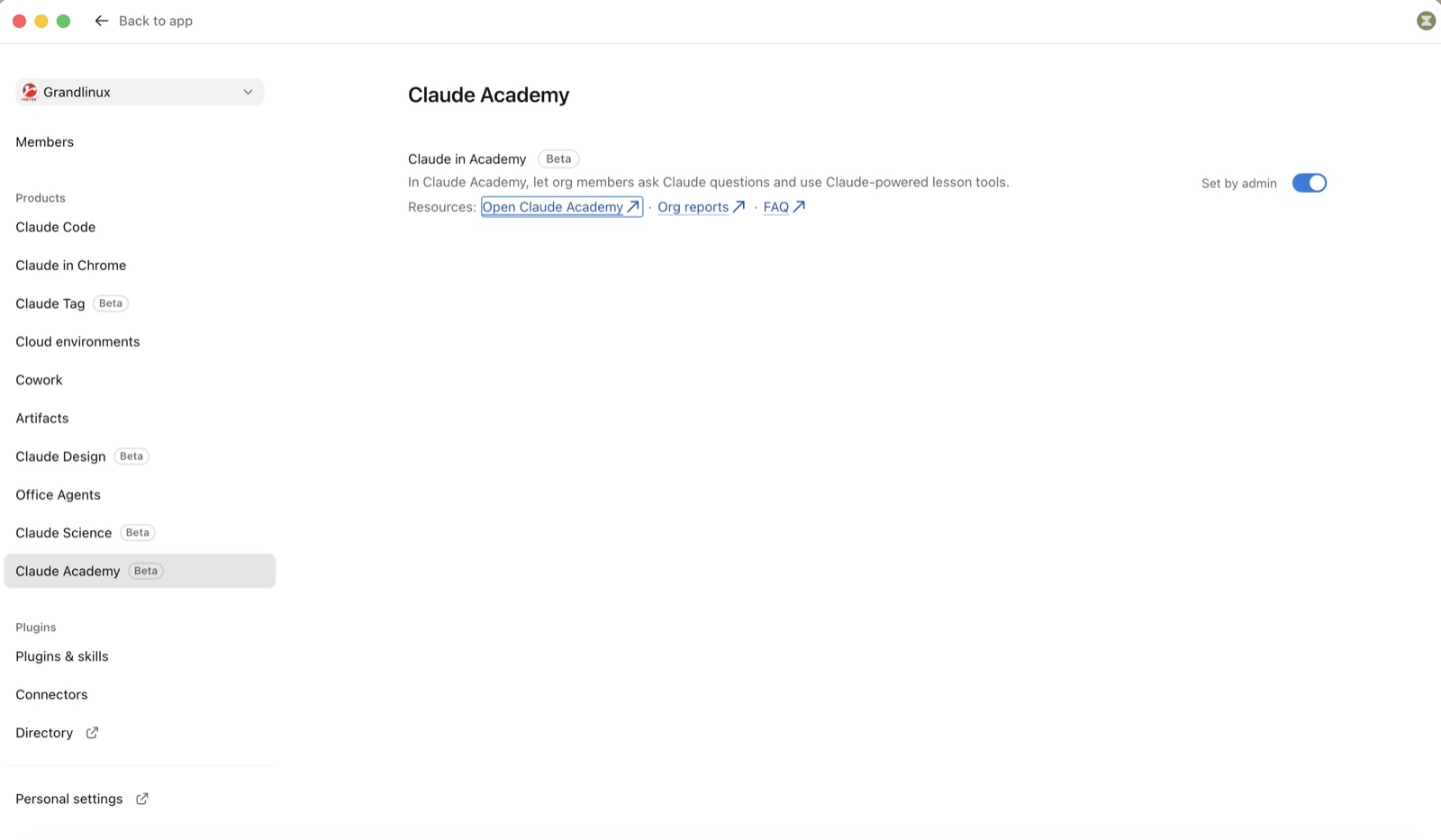
Academy has two layers. The first is the course content, which anyone can take without any configuration. The second is Claude embedded in the lesson pages, which actually calls the model. For accounts that belong to a Team or Enterprise organisation, that second layer is governed by a setting called "Claude in Academy". Only the organisation's Primary Owner or an Owner can change it. A regular Admin cannot. It lives under Admin settings → Products → Claude Academy and can be toggled at any time.
According to the Academy FAQ, the setting unlocks three things for members:
- The Ask Claude button in the corner of the page, for questions about what you are learning right now. Your question is matched to the relevant lesson pages before Claude answers, so there is no need to open a separate chat tab.
- The "turn this into a diagram" lesson tool: select a passage and Claude draws a diagram that explains it.
- The "quiz me" lesson tool: select a passage and Claude asks you questions to test your understanding.
With the setting off, members do not see those buttons at all, but they can still sign in, take courses, pass quizzes and earn badges. The screenshot below is the real page from the Team console our own company uses. The Claude Academy entry sits in the Products group with a Beta label. The switch is named Claude in Academy and marked Set by admin. The line under it says plainly "let org members ask Claude questions and use Claude-powered lesson tools", and three links sit beneath: Open Claude Academy, Org reports and FAQ. It was off the first time we opened the page, so someone has to go in and turn it on. That is why some organisations open Academy to staff and then wonder why there is no Ask Claude button.
Here is the kind of question an accountant can type straight into the lesson on Projects:
This lesson says a Project can hold instructions and reference files.
If our accounting team wants Claude to always refer to our chart of accounts
and our depreciation policy, what should go into the Project, and what should not?
Questions like that are why the switch is worth having. Staff get an answer tied to their own work instead of just reading along, and then they go and try it in a real Project.
4. Cost, usage, seats and where the data goes
Admins tend to ask five things before they flip the switch. The FAQ answers all five.
| Question | Answer from the Academy FAQ | What it means for the organisation |
|---|---|---|
| Extra charge? | No separate charge. | No extra budget approval needed. |
| How is usage counted? | A question asked in Academy counts toward that member's normal Claude usage, the same as one chat message. If usage credits are on, the existing monthly spend limits apply. | When a whole department trains at once, per-person quota drains faster. See Team plan session quotas and plan limits. |
| Does it use seats? | It neither adds nor uses up seats, but members must already hold a seat in the organisation. | People without a seat can still take courses, just without Claude inside the lessons. |
| Can admins read the questions? | No. Org reports show courses, status and dates only. | Staff can ask basic questions without feeling watched. |
| Where are questions stored? | Not saved to chat history in Academy or Claude, not added to memory, not used to train models. Retained under the organisation's existing data retention settings. | Same rules as ordinary chat. More in Claude data governance and security. |
The part legal teams like: lesson questions and answers are not kept in history, not added to memory and not used for training. Those are the same terms a Team organisation already has, so if you have done your PDPA paperwork for Claude, you do not need a separate set for Academy.
Read this first if you track subprocessors: when Academy's search box runs semantic search, the text you type is sent to Google Cloud, one of Anthropic's service providers, to rank pages. Anthropic does not log the search text. If you are signed in and semantic search is not available for your organisation, search falls back to keyword matching and nothing is sent. The connector described in section 7 always goes to Google Cloud, because it is unauthenticated. The FAQ says this plainly and points to the subprocessor list at trust.anthropic.com.
5. Org reports: what admins can and cannot see
Alongside the switch, admins get an organisation-level report. Open it from the avatar in the top-right corner of Academy and choose Org reports, or click the Org reports link on the Admin settings → Products → Claude Academy page shown in section 3, signed in with the account you use at work. If claude.ai asks you to approve access to reports, approve it. Every signed-in member sees the menu item, but the report only opens for the Primary Owner, Owners, Admins, and members whose custom role includes the Analytics permission.
| Visible | Not visible |
|---|---|
| Courses each member enrolled in · five states (Enrolled, In progress, Completed, Badge earned, Withdrawn) · email address or Claude account ID · dates enrolled, finished and badge earned · filters by course, status and name, plus a CSV download | Quiz scores · number of attempts · time spent · anything members asked Claude inside lessons |
The CSV has eight columns, one row per learner per course, times in UTC. The 30-day, 90-day and all-time buttons do not change the download, but any filters you have set do. Click Clear all first if you want every row.
claude_account_id, learner_email, course_slug, course_title,
state, enrolled_at, completed_at, badge_issued_at
Three rules make numbers disappear from the report. Tell HR before they notice:
- A course counts for your organisation only if the member was signed in to claude.ai with the organisation account when the course was first added to their history. A course started on a personal account and finished after joining does not appear, and it cannot be moved.
- When a member leaves the organisation, all their rows disappear, including completed courses and badges. They reappear if the person rejoins with the same Claude account.
- If a learner deletes their Academy data or their Claude account, the rows are gone permanently.
6. A Team admin checklist before opening it to everyone
- Have everyone sign in to claude.ai with the organisation account (or company SSO) before they click Sign in on Academy. Academy binds to whichever account and organisation was active at first authorisation. Anyone who used a personal account should sign out of claude.ai, sign back in with the work account, and authorise Academy again. Progress on the personal account stays there.
- An Owner turns on the switch under Admin settings → Products → Claude Academy.
- If a member sees "you haven't been added to your organisation yet", an admin must add them as a member in the Claude console first, then the person signs out, signs in and re-authorises. It cannot be fixed from the Academy side.
- Set spend limits if usage credits are on, per member or per group, because lesson questions count like chat.
- Enable the Claude Academy connector for the organisation if you also want people to find courses from the chat window (optional, see section 7).
- Tell the team in advance that a badge is not a certification, so nobody lists it as one on a CV.
- Assign one mandatory course per role, put it in your 30-day rollout plan, and check Org reports weekly. Use the Badge earned state as the finish line.
7. Calling Academy from chat and from Claude Code
Anthropic ships a connector called Claude Academy. It is an MCP (Model Context Protocol) server at https://academy.claude.com/mcp, read-only, with no sign-in. It has three tools: search_academy (keyword search across courses, lessons, tutorials and use cases), get_content (read one item: tutorials and use cases in full, courses as a summary plus ordered lesson list, quiz or members-only lessons as an outline) and list_content (list everything published). Every answer links back to the site. It searches English content only and has been in the marketplace since August 2026.
To add it in Claude on the web or desktop, open Customize → Connectors → Discover, find Claude Academy and click Connect. On Team and Enterprise plans an owner or admin may need to enable it for the organisation first. If it is not in the directory, add it as a custom connector named Claude Academy with the URL above. Cowork uses the same connectors. Claude Code needs one command:
claude mcp add --transport http claude-academy https://academy.claude.com/mcp
Prompts Anthropic suggests:
Search Claude Academy for courses about building MCP servers and give me the links.
Open the Academy tutorial at https://academy.claude.com/tutorials/creating-your-first-skill and walk me through it step by step.
What does the Claude Code 101 course cover? Show me its lesson list.
There is also a Claude Academy Skill you can install. Claude then recommends courses or learning paths based on how you actually work with it. If Skills are new to you, start with what a Claude Skill is, and see Connectors and Enterprise Search for how organisations manage connectors.
The connector does not know who is asking and cannot see your conversation. The server logs tool names and result counts, not query text. It also cannot see your progress or badges; sign in on the site for those.
8. Who should take what: a sample plan for a Thai organisation
This table is an example of mapping courses to roles, not a fixed recipe. Times come from the course pages. Add margin for people who read English slowly.
| Role | Suggested courses | Time | How to use Claude in Academy |
|---|---|---|---|
| General users accounting, procurement, HR, admin | Claude 101 → AI Fluency: Framework and foundations | 2.5 + 4 h | Hit "quiz me" at the end of every lesson, then ask Ask Claude using a real example from your own department. |
| Executives | AI capabilities and limitations → Building effective human-agent teams | 3.5 h + 45 min | Use "turn into a diagram" on the context-limits section and take it to your next management meeting. |
| IT / Claude admins | Deploying Claude Enterprise with confidence + the Claude Enterprise Administrator Guide tutorial | 2.5 h + 20 min | Ask about SSO/SCIM against the identity system your company runs, then configure per your Admin Console policy. |
| Developers / integration team | Claude Code 101 → Introduction to MCP → MCP: Advanced topics | 1.5 + 1 + 1.5 h | Ask Ask Claude whether the tool in the lesson could connect to your company database, and where permissions need to be enforced. |
9. Things to weigh before you decide
- Core content is English. You can type questions to Ask Claude in Thai just as in ordinary chat, but the lessons and quizzes are in English. Teams that read English slowly will take longer than the course page says.
- Learning history cannot move between emails. Staff who are leaving and want to keep a badge should download the PDF and save the verification link first. The link keeps working after they leave.
- Badges never expire and there is no re-certification when a new model ships, but a badge is not a certification. The Claude certification exams are a separate paid, proctored programme delivered through Pearson with credentials issued via Credly, open only to Anthropic partners through the partner learning site.
- The switch is still beta. Menu names may change, but the usage and data rules in the FAQ are clear enough to decide on today.
- Hosting the content in your own LMS (learning management system) goes through your Anthropic account team and is granted only in some cases. Anthropic is not taking content partnerships at the moment.
Claude Academy and Saeree ERP work
Straight answer first: Saeree ERP has no built-in AI. What Grand Linux does is supply Claude Team and Enterprise licences with a Thai tax invoice, and take on separate projects that connect Claude to the ERP through MCP (see Claude Integration). The ERP stays the single source of truth. Claude is the assistant that reads and summarises.
Academy fits in two places. The first is our own team. The Saeree ERP team completed Claude 101 in April 2026, and the Introduction to MCP and MCP: Advanced topics courses are what we recommend a customer's IT team take before an integration project starts, because connecting MCP to an ERP is about permissions and tool scope before it is about code. The second is customers who take Team licences from us. We recommend the Owner turns on Claude in Academy on delivery day, makes Claude 101 the mandatory course in week one of the rollout plan, and uses Org reports as the training evidence for HR instead of a sign-in sheet. No extra trainer to hire, and the quota used inside lessons is already covered by the seats you bought.
Conclusion
- Claude Academy is Anthropic's free learning site, launched 20 August 2026 to replace Anthropic Academy on Skilljar: 27 courses, free badges that never expire, usable with a free account.
- The Claude in Academy setting only governs "Claude inside the lessons": the Ask Claude button, the diagram tool and the quiz tool. With it off, members can still learn and earn badges.
- Only the Primary Owner and Owners can switch it on, under Admin settings → Products → Claude Academy. No separate charge, no seats consumed, questions count like chat messages.
- Questions are not saved to history, not added to memory, not used for training, and admins cannot read them. Org reports show courses, states and dates only.
- Before rolling out, have everyone sign in with the organisation account first. Otherwise their learning lands on a personal account and cannot be moved.
Buying Claude seats without teaching people to use them is like buying an ERP and skipping the training. Turning on Claude in Academy takes under a minute, and it lets staff ask the beginner questions nobody else will ever see.
- Saeree ERP team
References
- Claude Academy FAQ — sections "The 'Claude in Academy' setting, for organization admins" and "Org reports" (checked 28 Oct 2026)
- Claude Academy — course catalogue (lesson counts and durations as of 28 Oct 2026)
- Use Claude Academy from Claude — the Academy MCP connector guide
- Claude Marketplace — Claude Academy connector (added August 2026)
- Anthropic's approach to teaching and learning AI — Claude Academy launch article, claude.com (20 Aug 2026)
- Claude Enterprise Administrator Guide — admin tutorial on Academy
- EdTech Innovation Hub — Anthropic opens Claude Academy (24 Aug 2026)
Rolling Claude out to the whole team, but not sure how to train them?
Grand Linux supplies Claude Team and Enterprise licences with a Thai tax invoice, delivered with console setup guidance and a role-based course plan from Claude Academy. Fill in a short form, get a request number by email, and our sales team will call you back.
Get advice / request a quoteTel 02-347-7730 | sale@grandlinux.com