- 27
- March
Saeree ERP is an ERP system designed and developed specifically for Thai government agencies. With over 25 years of experience working alongside government organizations, from the Thailand Greenhouse Gas Management Organization (TGO), the National Science Museum (NSM), the National Vaccine Institute (NVI), to the Office of the Permanent Secretary of the Ministry of Higher Education, Science, Research and Innovation (MHESI) — this article takes you on a visual tour of every major module in Saeree ERP, along with comparisons to iDempiere, Odoo, and SAP to highlight the differences.
Saeree ERP is an Angular-based ERP system purpose-built for Thai government agencies. It features a 14-tab budget request form, built-in e-Saraban with digital signatures, full procurement cycle compliance, and unlimited user licensing — capabilities that generic ERP systems like Odoo or iDempiere simply do not offer out of the box.
Why Government ERP Needs a Different UI Than Commercial ERP
Most ERP systems on the market are designed for private businesses — focused on Sales Pipelines, customer invoicing, and e-Commerce. However, government agencies operate in an entirely different world: multi-year budget cycles, appropriation processes governed by the Budget Act, multi-tier committee approvals, procurement regulations mandated by the Comptroller General's Department, and Audit Trails that must be ready for inspection by the State Audit Office at all times.
This is why Grand Linux Solution Co., Ltd. built Saeree ERP from the ground up specifically for Thai government workflows, rather than trying to adapt a commercial ERP to fit the public sector. Every screen reflects this philosophy, from the 14-tab budget request form to the digital signature approval chain.
Technology Foundation
The frontend evolution of Saeree ERP tells the story of a development team that chose the right architecture over following trends:
| Period | Technology | UI Type |
|---|---|---|
| 1999-2019 | Java Swing (Compiere/ADempiere) | Desktop Application |
| 2019-Present | Angular 7 through 20+ with PrimeNG | Responsive Web Application |
The direct leap from Java Swing to Angular — skipping JSP and jQuery entirely — was a deliberate architectural decision. Angular's Object-Oriented TypeScript, Dependency Injection, and separation of HTML Templates from Component Logic align naturally with how Java developers think. The result is a codebase that government IT teams with Java backgrounds can maintain and extend.
Budget Management: The Unmatched Differentiator
No feature illustrates the gap between Saeree ERP and generic ERP systems more clearly than the budget module. Thai government agencies do not simply track expenses — they manage the entire cycle from budget requests, through appropriation under the Budget Act, to expenditure monitoring.
14-Tab Budget Request Form
Each budget request in Saeree ERP captures data across 14 specialized tabs: Summary, General, Strategy Alignment, KPI Indicators, Work Plan, Funding Plan, Risk Assessment, New Positions, Training, Outsourcing, Rental, Investment, Investment Details, and Activities/Expenses — every tab is interconnected in real time with color-coded completeness indicators (green = complete, red = requires review).
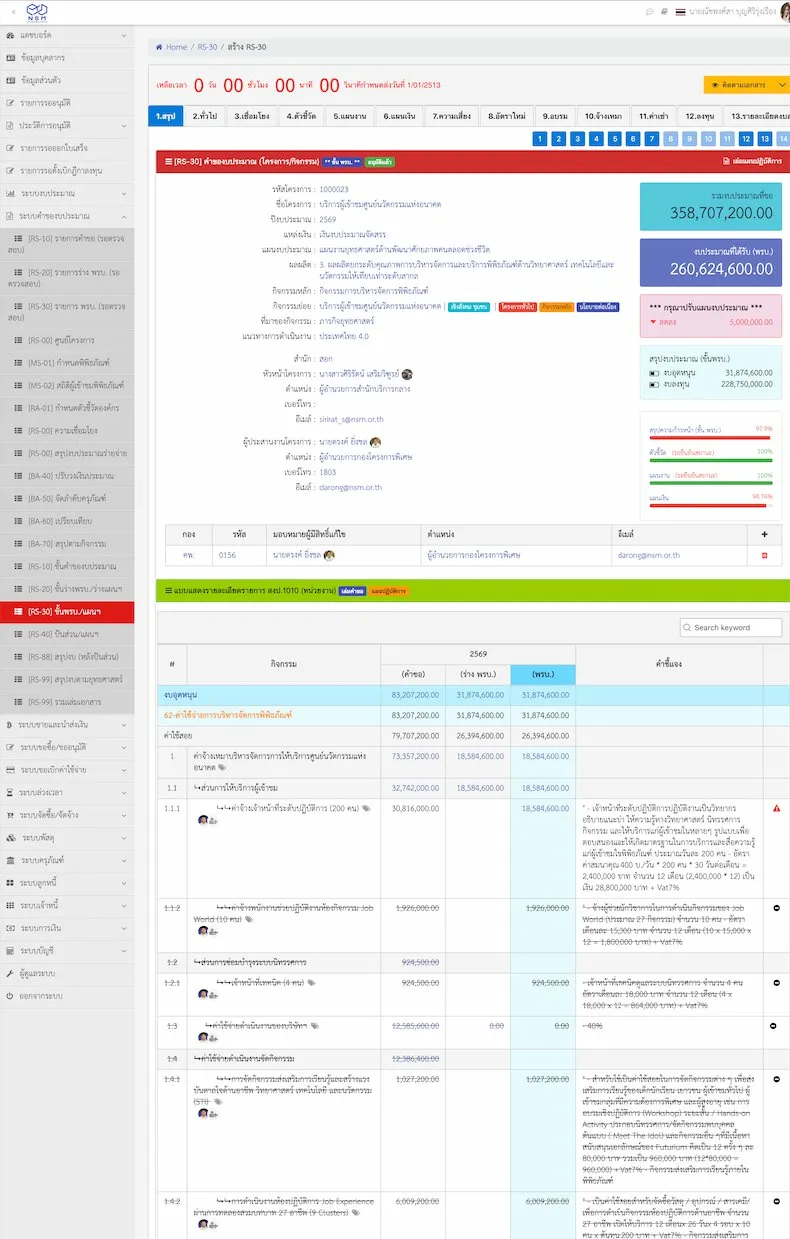
14-Tab Budget Request Form — Project overview with completeness status indicators for each section
Budget Dashboard MHESI V2
Once budgets are approved, Saeree ERP provides a real-time expenditure tracking dashboard that goes far beyond simple budget-vs-actual comparisons. The MHESI V2 Dashboard displays 7-column tracking from total budget, through PO commitments, payments, to remaining balance — covering both GFMIS and ERP sides — with drill-down capability to the activity level.
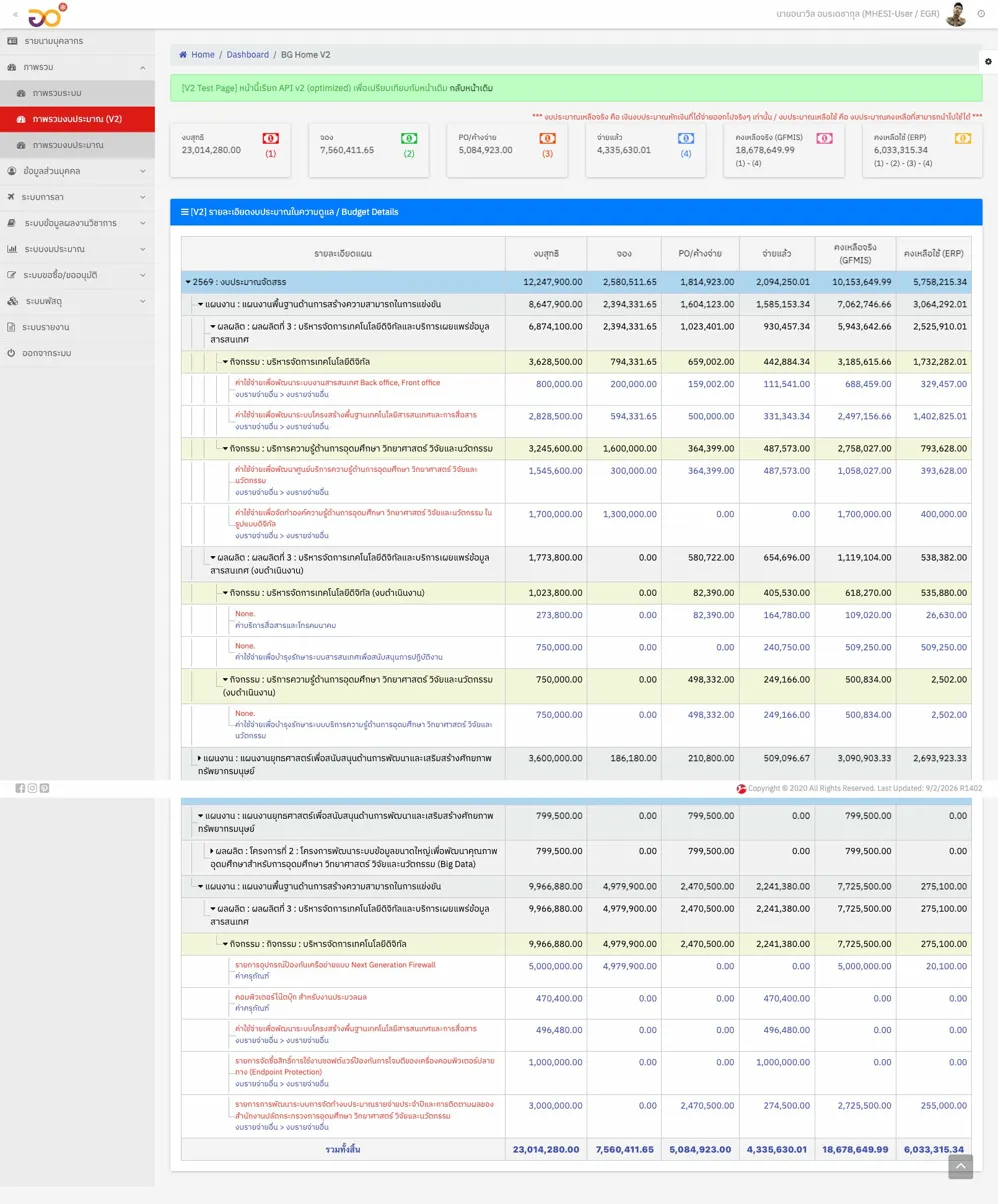
Budget Dashboard MHESI V2 — Real-time budget tracking from total allocation to remaining balance
Budget Usage Report NSM BGU-01A
The NSM budget usage report displays KPI Cards summarizing expenditure percentages at each stage (PR, PO, AP/AR, FI), along with Pie Charts showing budget proportions by funding source, and Bar Charts comparing planned versus actual expenditure.
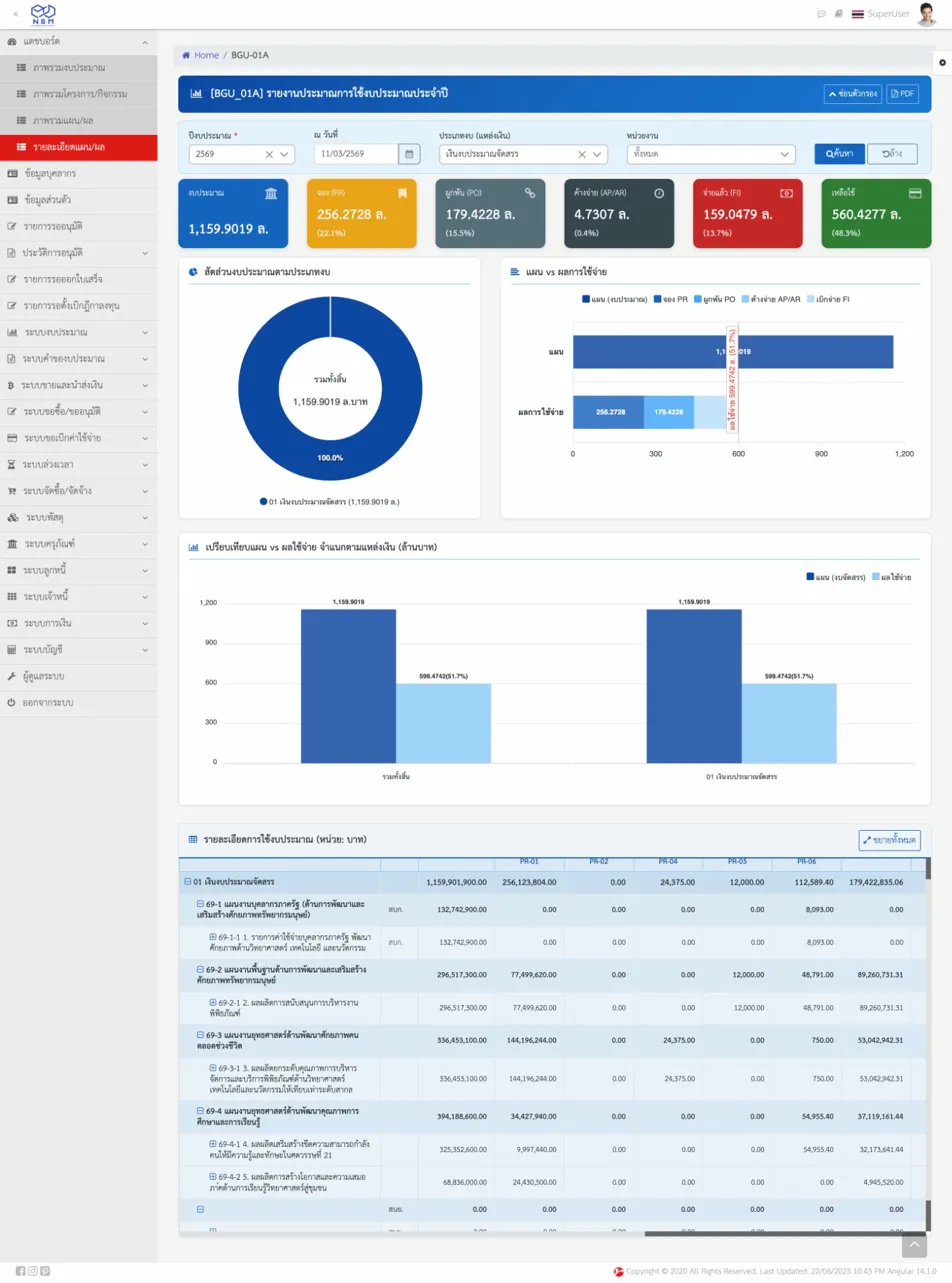
NSM Budget Usage Report (BGU-01A) — Budget expenditure status with KPI Cards, Pie Chart, and Bar Chart
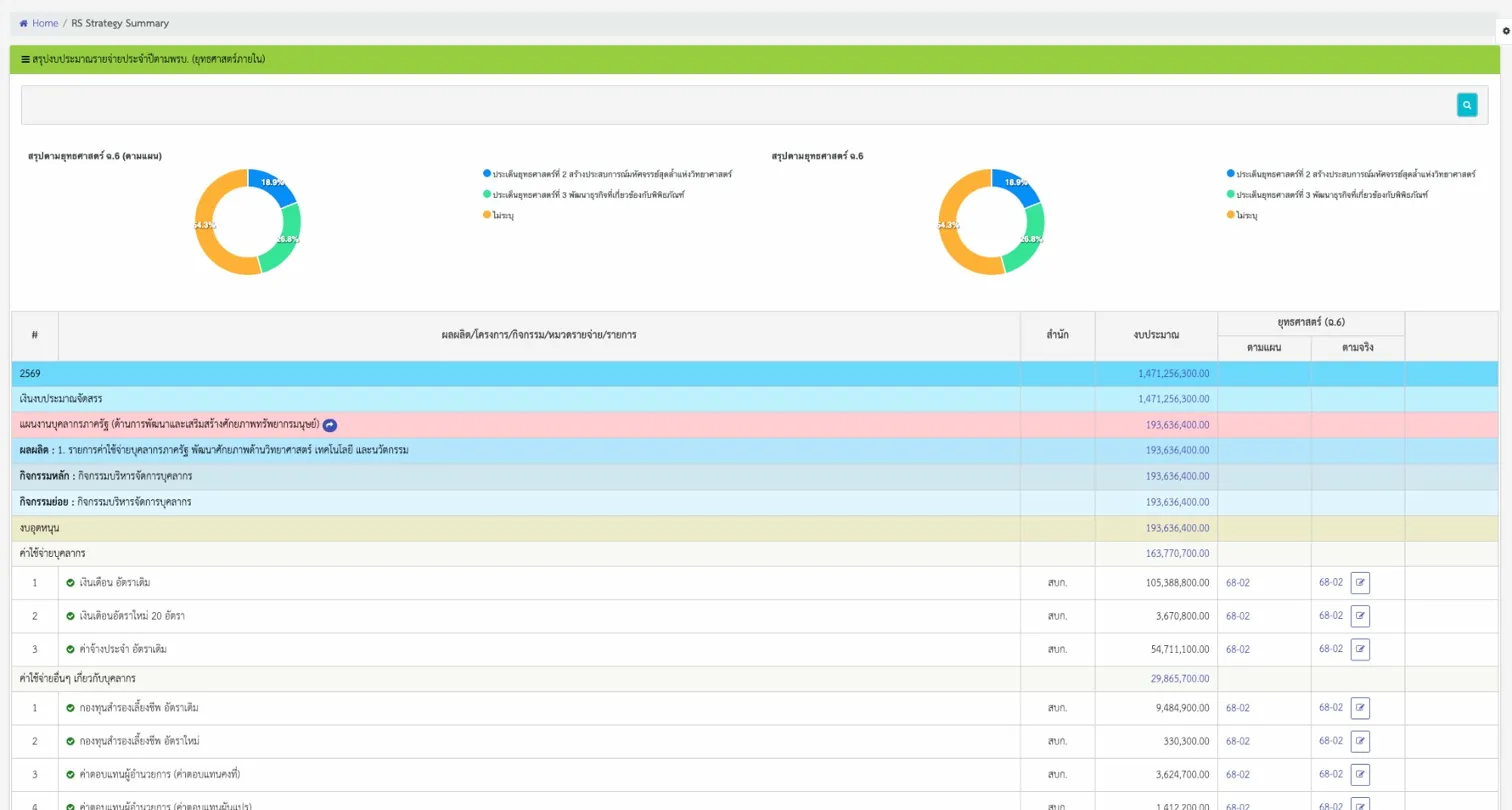
RS Allocation Summary
The budget allocation summary screen displays Donut Charts and Bar Charts breaking down annual expenditure by strategic targets, along with monthly detail tables. Executives can see the complete budget distribution picture on a single screen.
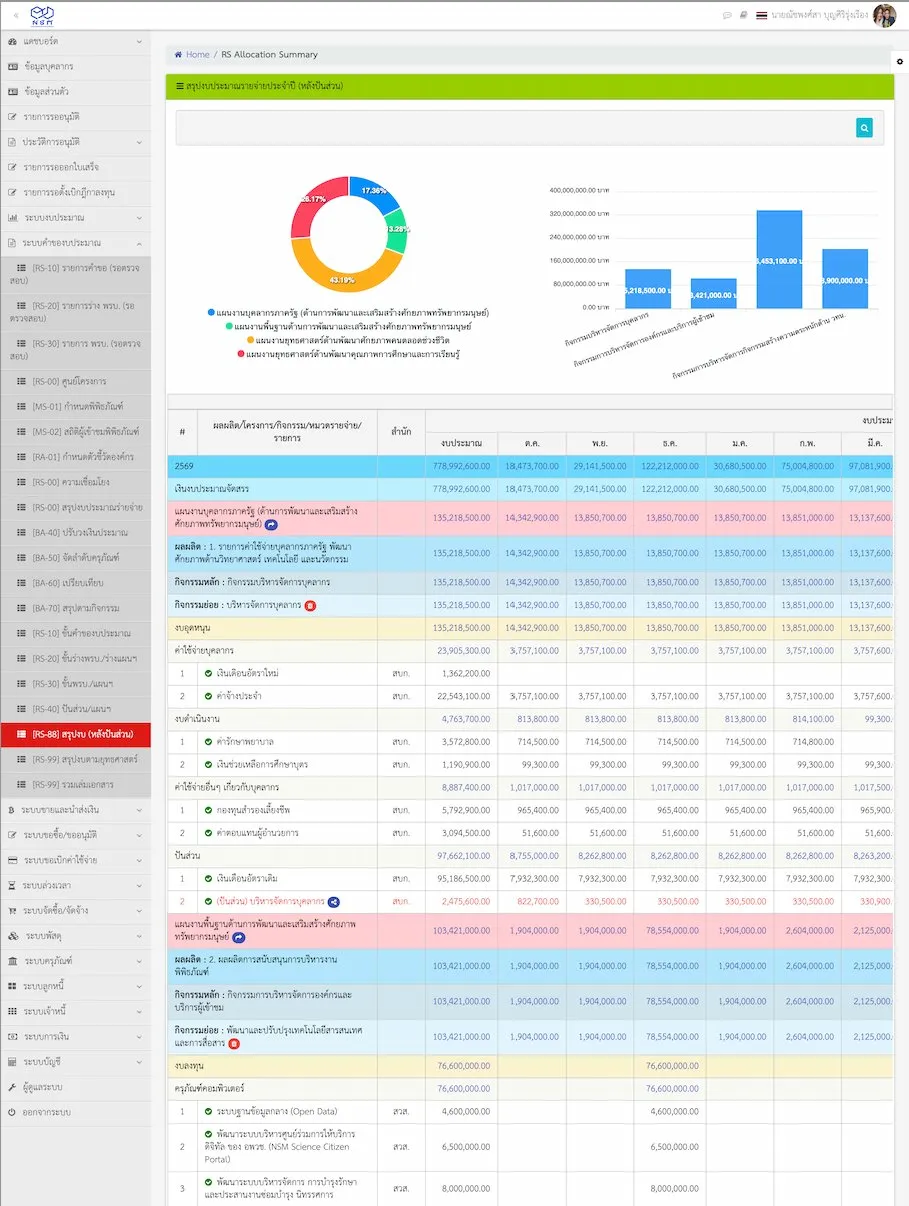
RS Allocation Summary — Budget allocation overview by strategic targets
RS Adjust — Mid-Year Budget Adjustment
The mid-year budget adjustment screen displays increase/decrease items with color-coded indicators (red = budget cut, green = budget increase) along with percentage changes, allowing executives to see the impact of budget adjustments immediately.
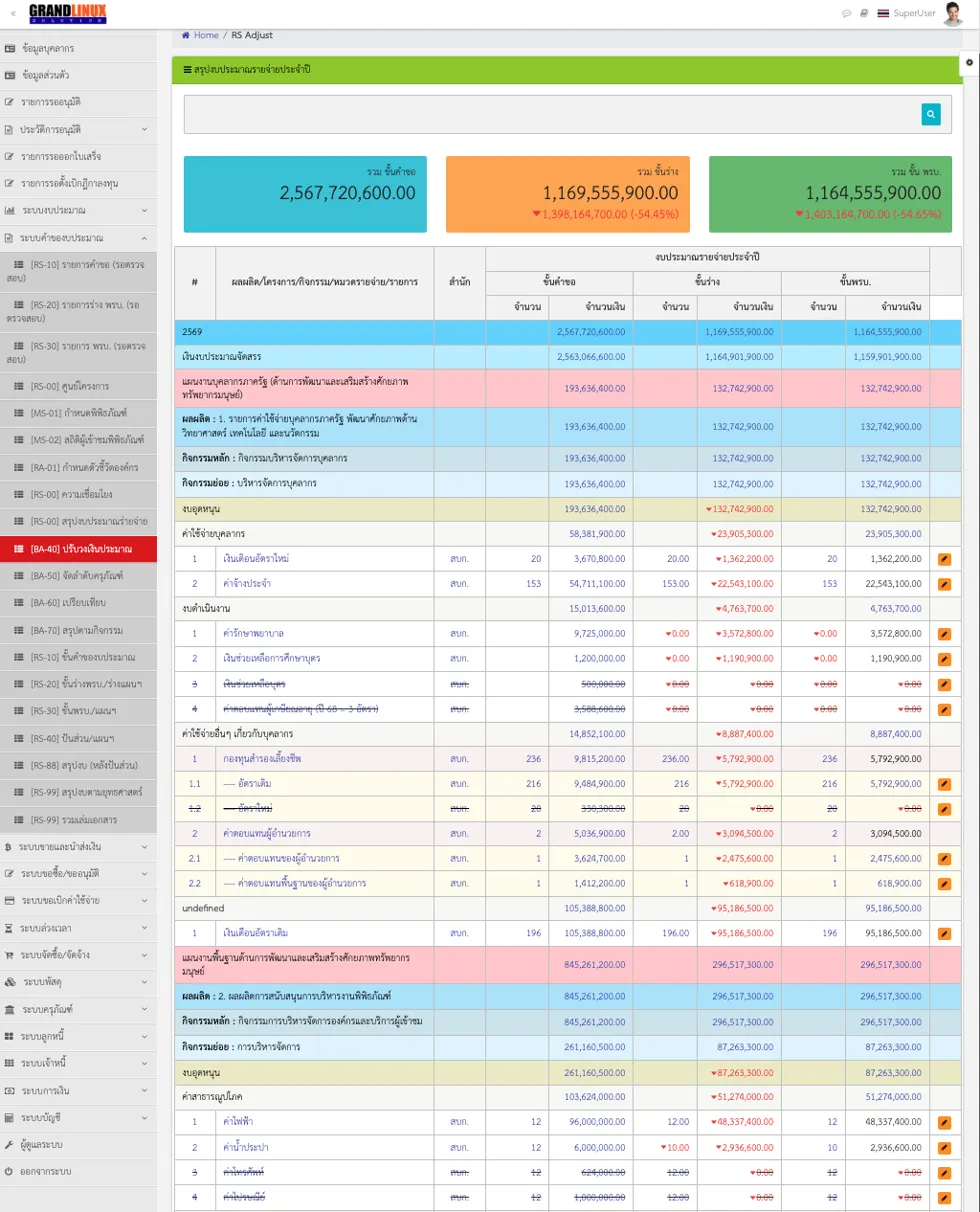
RS Adjust — Mid-year budget adjustment with color-coded directional change indicators
Budgeting Setup Diagram
The Budget Data Structure diagram (Entity Relationship Diagram) shows the relationships between all Master Data in the budget system — from work plans and budget allocations through ministry-level strategies to KPIs and agency-level achievements. Each box is clickable, allowing users to navigate directly to the Master Data management screen for that entity.
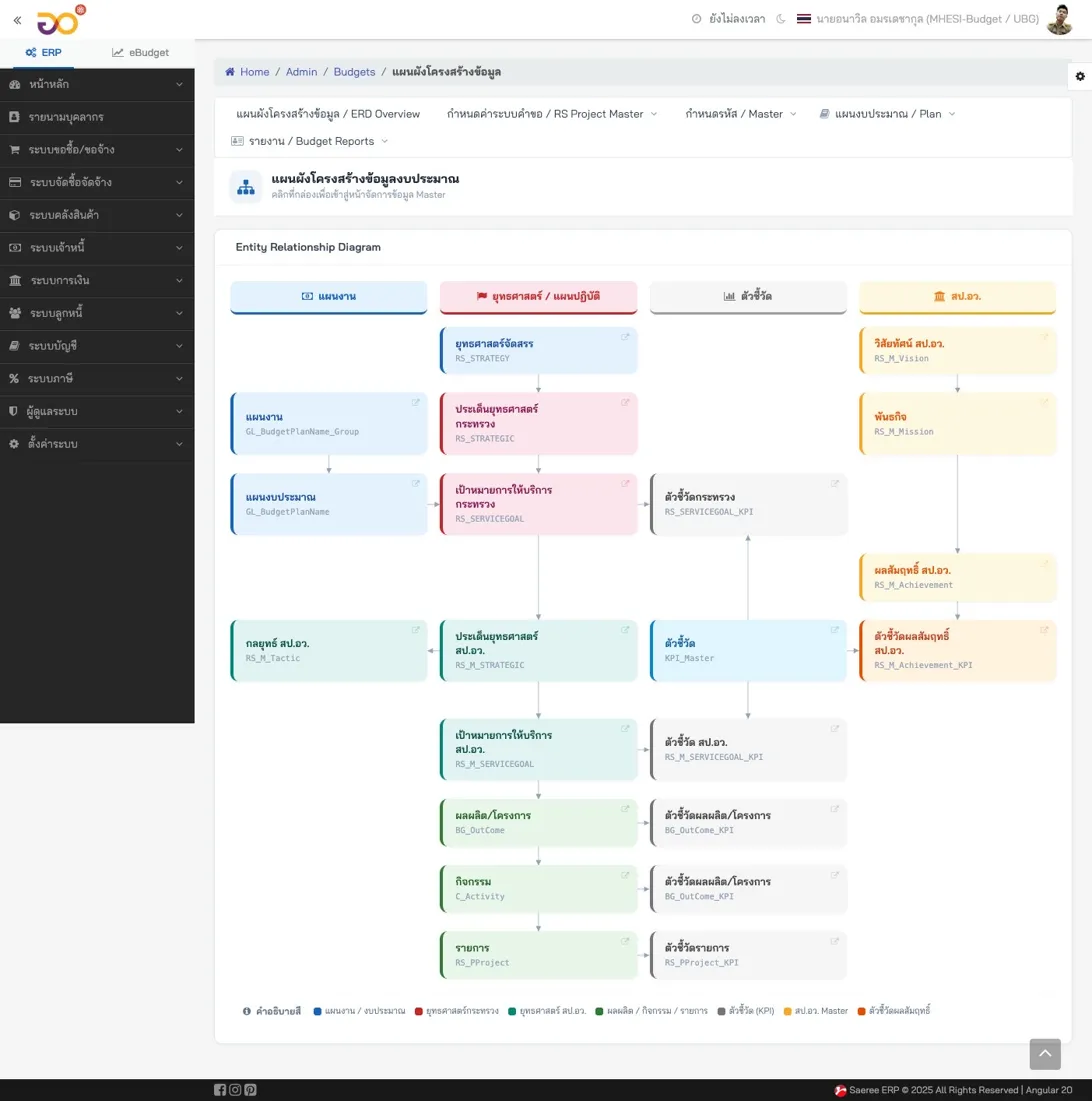
Budgeting Setup Diagram — Master Data structure for the budget system. Click any box to manage that entity directly.
The system supports the full 4-stage Thai government budget cycle: (1) Request Stage — agencies submit budget requests (2) Draft Act Stage — planning division reviews and adjusts (3) Budget Act Stage — approved budget ready for use (4) Adjustment — mid-year modifications with complete Audit Trail. Each stage has dedicated read-write permissions, approval workflows, and separate summary reports.
Procurement: Complete Document Cycle
Saeree ERP features a procurement system designed specifically for Thai government procurement regulations, covering documents from PR-01 (Purchase/Service Request), PR-02 (Travel Expenses), PR-04 (Committee Allowances), PR-06 (Other Expenses), PO-01 (Purchase Order), IM-01 (Goods Inspection), through to AP-01 (Invoice) — every document shows its position in the procurement chain (PR - PO - IM - AP - FI) with progress status displayed at the top of every form.
PR-01 Purchase/Service Request
The screen displays real-time remaining budget at the time of document creation, along with linked budget plan details, item/service lines, committee approval routing, and document tracking status.
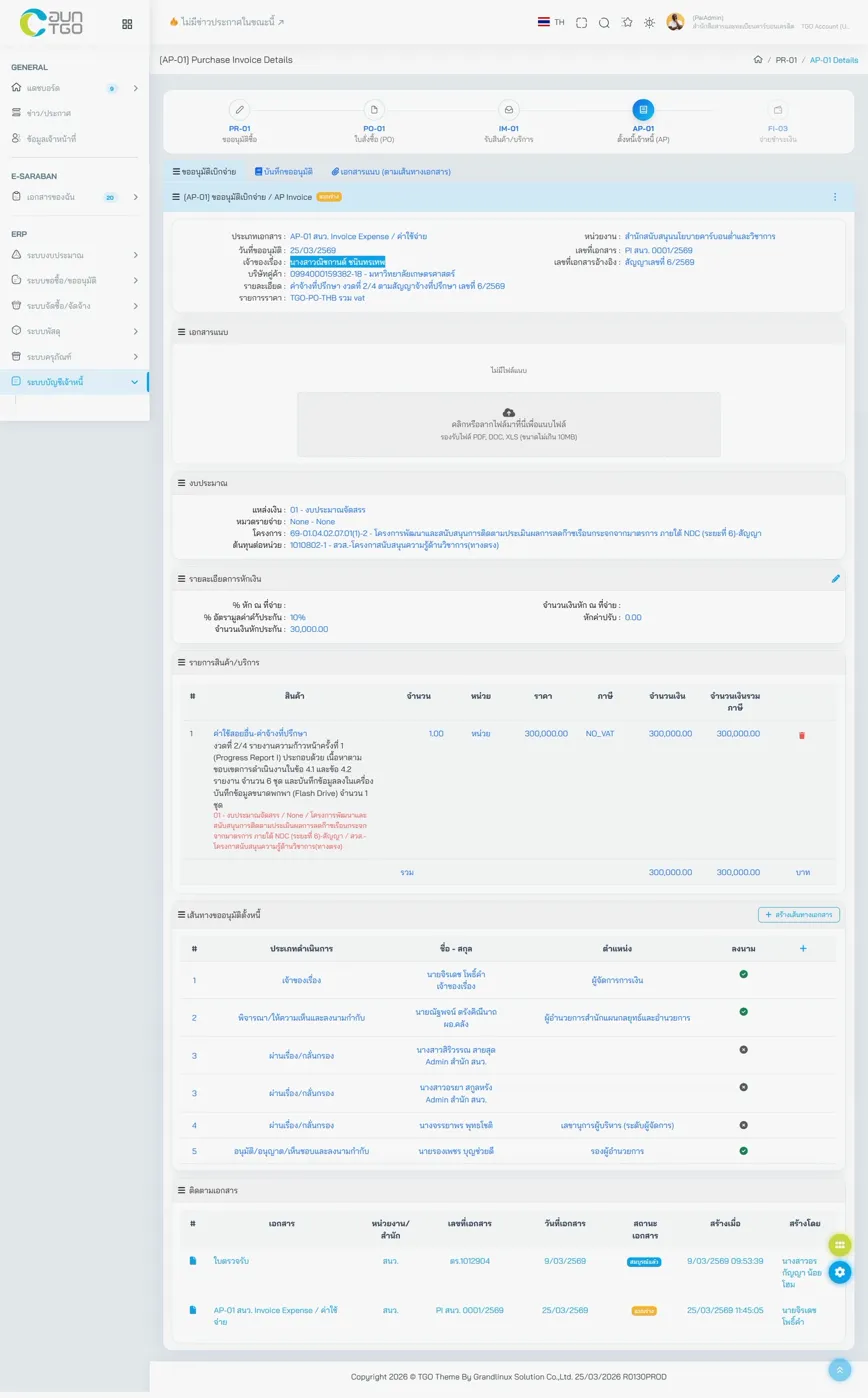
PR-01 Purchase/Service Request — Real-time remaining budget and item details
Digital Document Approval System (e-Saraban)
One of the most distinctive features of Saeree ERP is the e-Saraban (electronic records management) system with built-in digital signatures, which eliminates paper-based approval processes entirely. The system supports more than 5 signatories per document, with timestamps, positions, and signature images displayed directly on the document.
Official Memorandum with Digital Signatures
The screen displays official memoranda in the standard Thai government format, complete with subject line, reference number, and fully formatted content. Below the document, the digital signature chain shows the complete action history (Draft, Review, Forward, Approve, Receive).
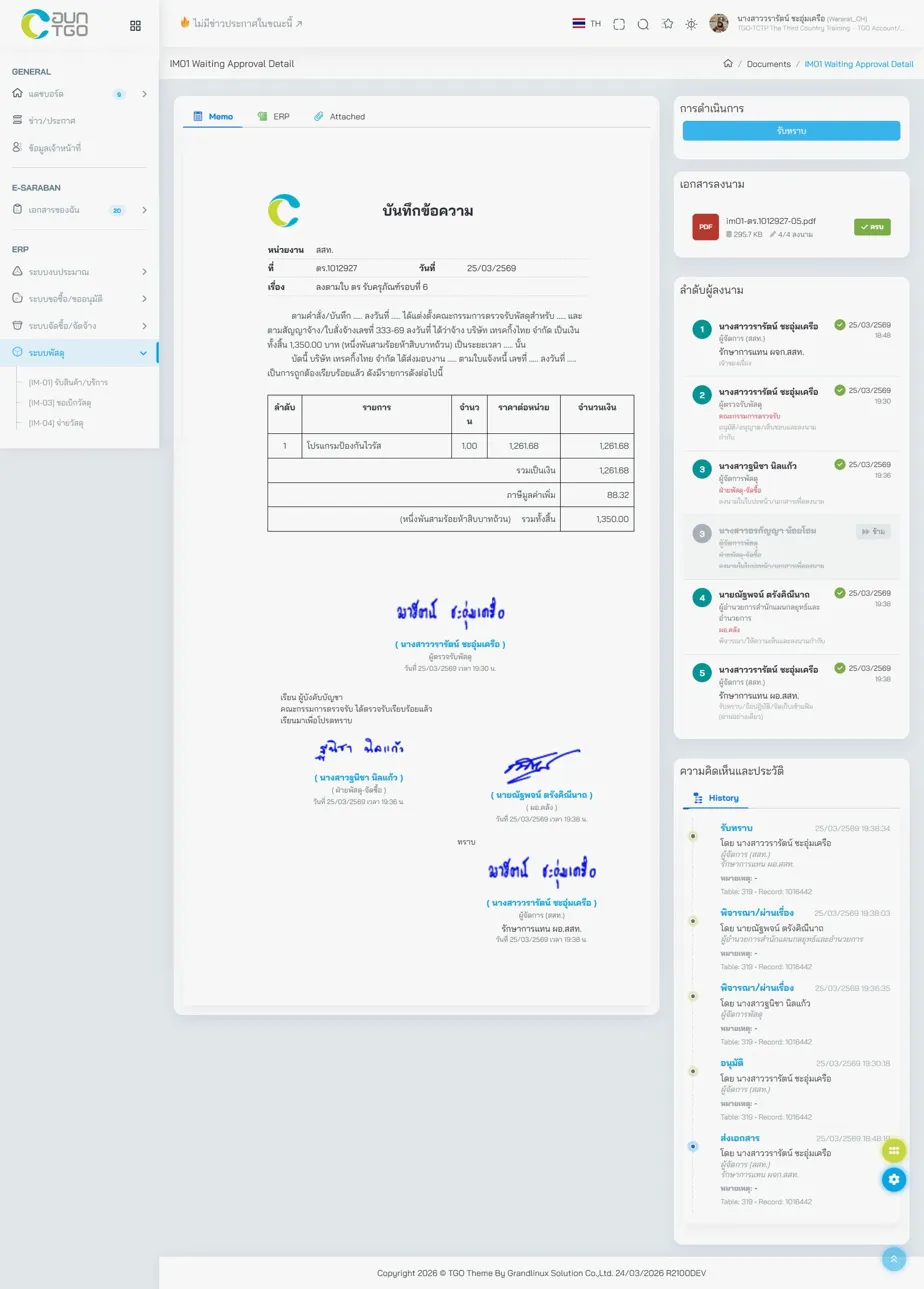
Official Memorandum with Digital Signatures — Thai government format with complete approval chain
Procurement Documents with Digital Signatures
All procurement document types can also carry digital signatures, with cross-document references (PR, PO, Contract) and status badges.
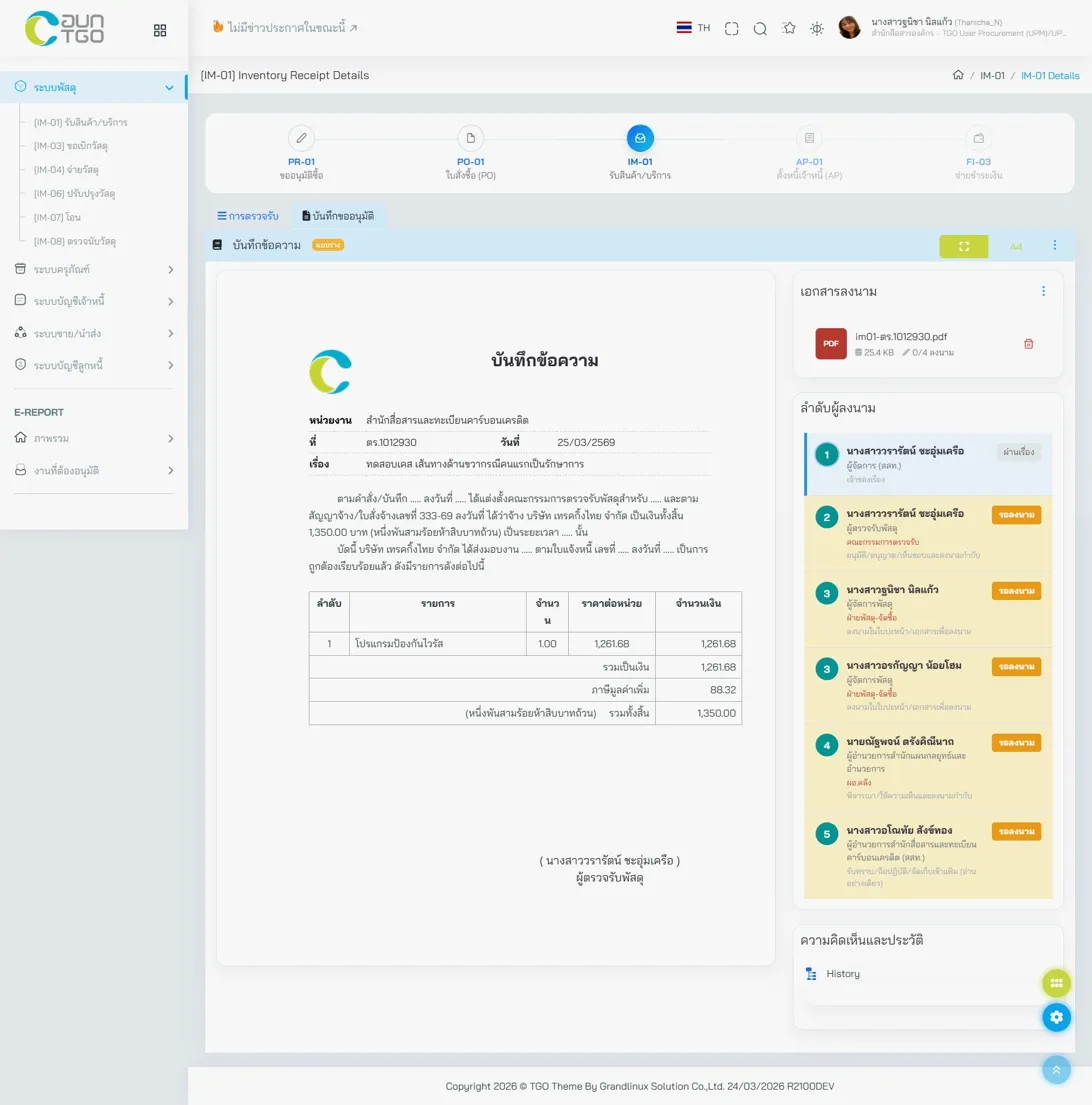
Procurement Document with Digital Signatures — Cross-document references and status badges
Saeree ERP's e-Saraban is a built-in system — no additional module purchase required. In contrast, Odoo requires a third-party module for this functionality, and iDempiere does not offer this feature at all.
Accounting & Finance
Chart of Accounts
The Tree View screen displays the entire chart of accounts in an expandable/collapsible format, with account codes, Thai account names, account types, status (Active/Summary), and a quick search function by account code.
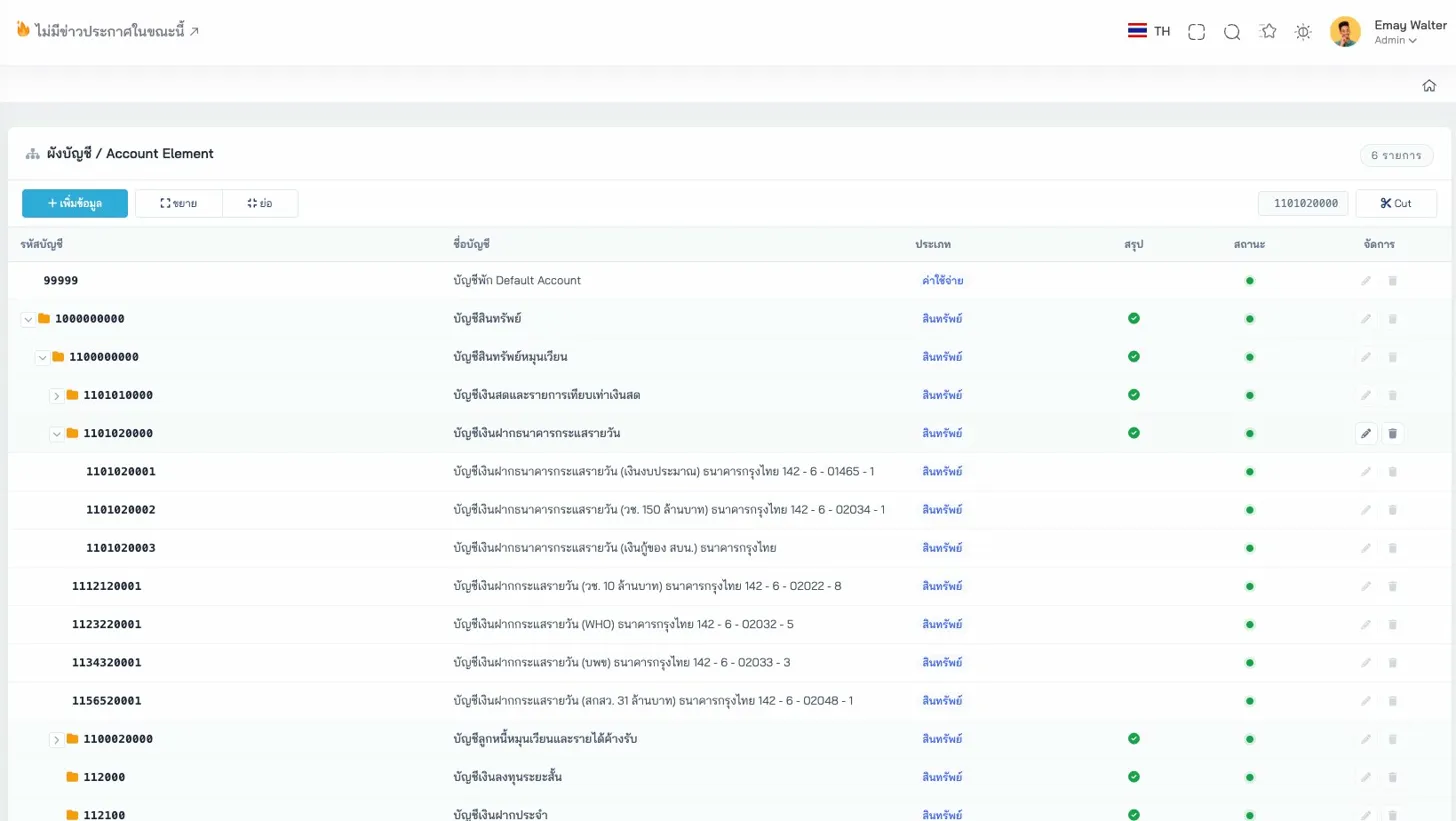
Chart of Accounts — Tree View with account codes, Thai names, and status
Accounting Schema
Card-based accounting standard configuration covering GAAP standards (International or Thai Government), currency and cost levels, toggles for budget checking, negative balances, and project-level budget verification, as well as Suspense, Error, and Currency Balancing accounts.
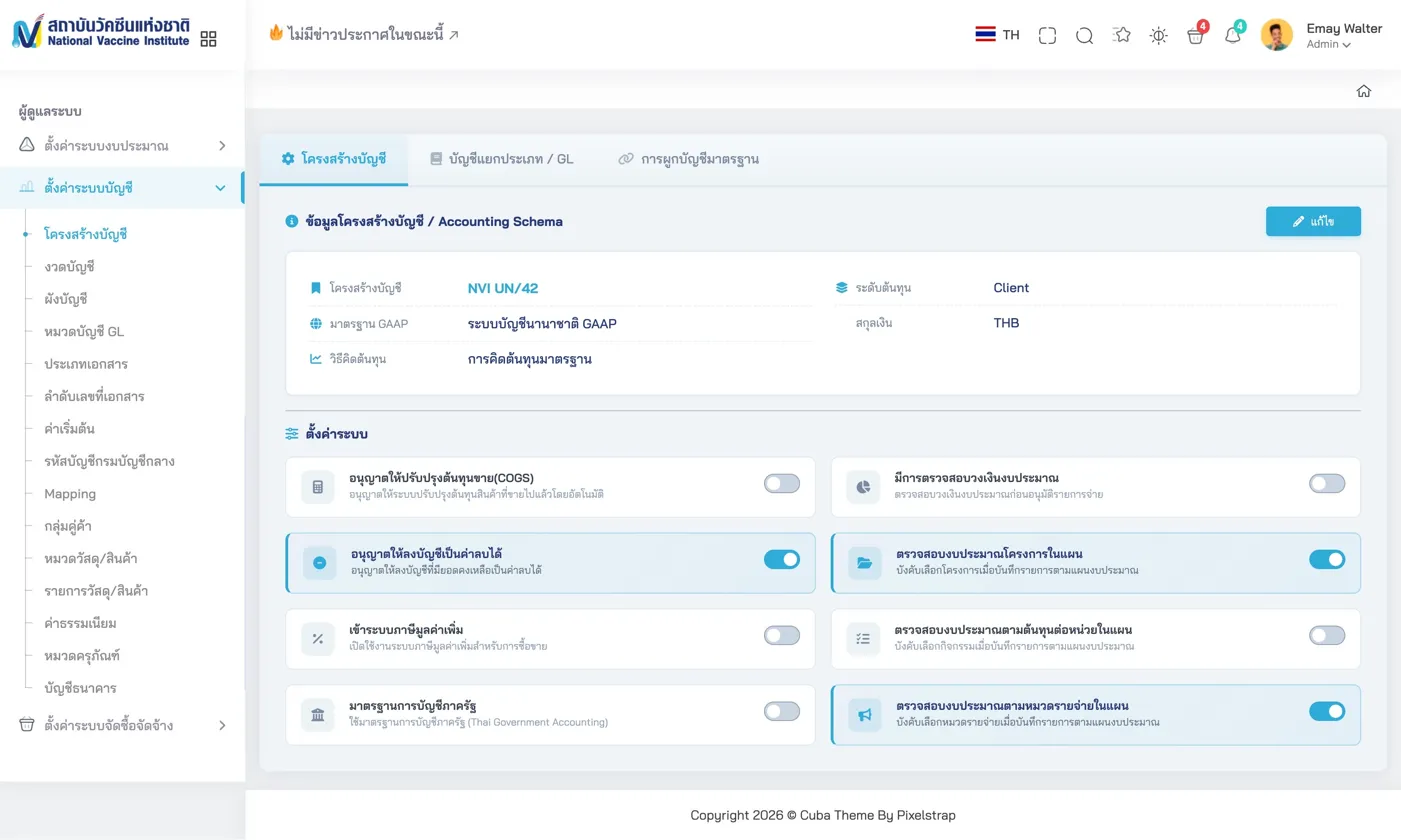
Accounting Schema — Card-based Thai government accounting standard configuration
Accounting Defaults
A comprehensive default account assignment screen, categorized by Business Partner, Product, Warehouse, Bank, and Tax, with bilingual labels (Thai/English) for every account type.
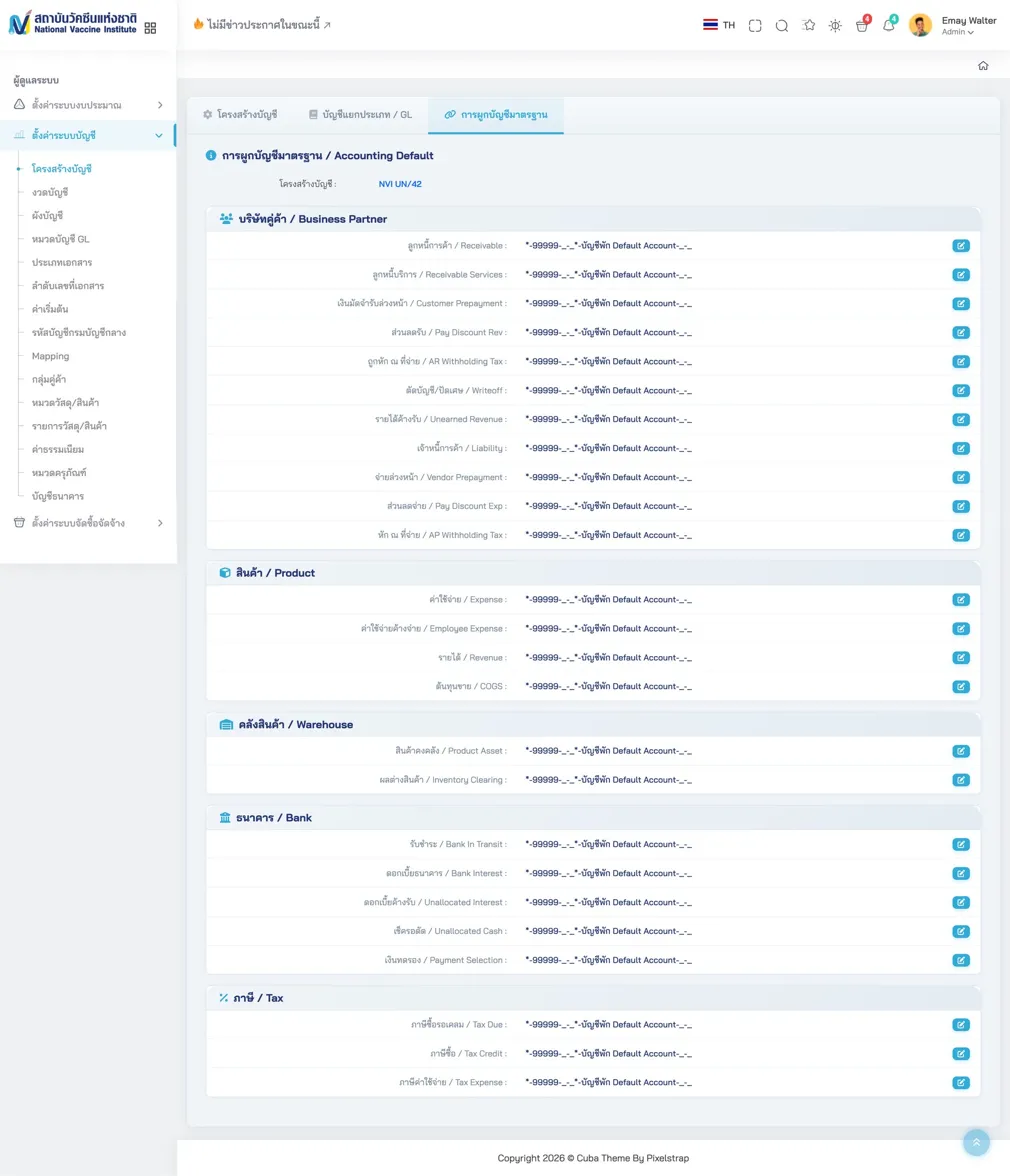
Accounting Defaults — Default account assignments categorized by type with bilingual labels
Human Resource Management
The Saeree ERP HR module includes a performance evaluation system designed according to Thai government performance assessment principles.
Performance Evaluation
A comprehensive performance evaluation system comprising: employee profile with photo, department, and position; weighted KPI scoring with Bubble Rating (1-5) from multiple evaluators; Competency assessment across 4 dimensions (Service Mind, Creativity, Teamwork, Organization Support); and a final composite score from KPI (70%) and Competency (30%) weightings.
Performance Evaluation — KPI + Competency assessment with Bubble Rating
KPI Import & Management
For agencies managing large numbers of KPI indicators, Saeree ERP provides a step-by-step Excel Import Wizard (Upload - Validate - Import - Complete) with progress reporting and error reports.
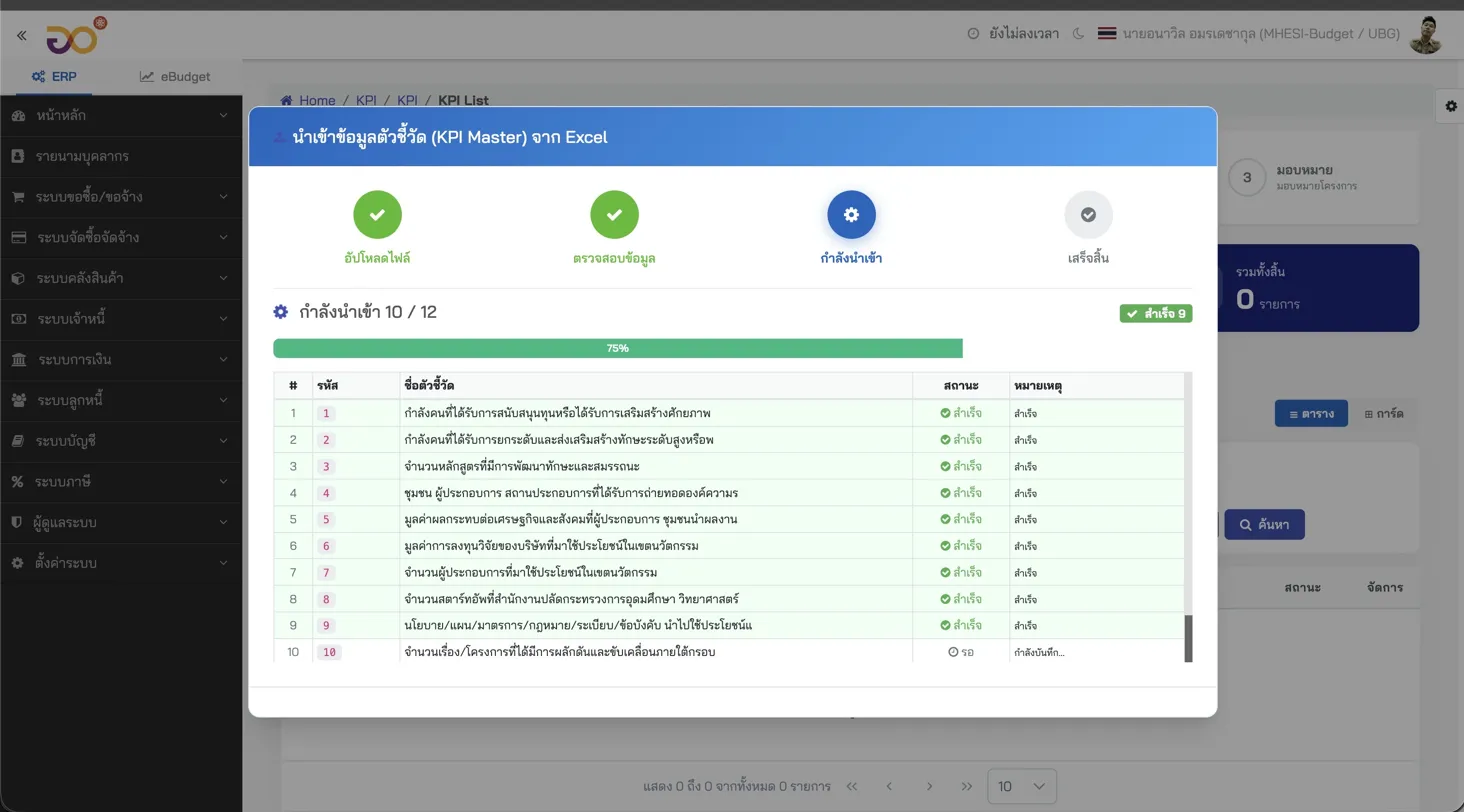
KPI Import Wizard — Step-by-step KPI indicator import from Excel with status reporting
Saeree ERP vs Competitors
To provide a clear picture of how Saeree ERP differs from other ERP systems, here is a comparison across key areas (Read more: Saeree ERP vs SAP).
Saeree ERP vs iDempiere
iDempiere, which shares the same ADempiere/Compiere roots as Saeree ERP, still uses the ZK Framework for its Web Interface. The iDempiere community acknowledged at the Budapest Conference in 2025 that UI/UX improvement is a priority and is considering migration to React or Angular — but has not yet started, while Saeree ERP completed this transition in 2019.
| Aspect | Saeree ERP | iDempiere |
|---|---|---|
| Frontend | Angular 20+ with PrimeNG, Responsive, Card-based, Interactive Charts | ZK Server-rendered UI, Traditional Form, Limited Charts, Not Mobile-optimized |
| Government Budget | 14 Tabs, 4-stage budget cycle, Real-time Dashboard | Not available |
| e-Saraban | Built-in with digital signatures | Not available |
| Thai Gov Procurement | PR-01 through AP-01 per Comptroller General regulations | Not available |
Saeree ERP vs Odoo
Odoo (versions 18/19) has invested heavily in UI — clean menus, PWA support, modern aesthetics. However:
| Aspect | Saeree ERP | Odoo |
|---|---|---|
| Budget | 4-stage government budget cycle + 14 Tabs | Basic budgeting, no Budget Act cycle support |
| Procurement | Thai government procurement regulations PR-01 through PR-06, committee approvals | Commercial workflow, no PR-01 through PR-06 documents |
| Digital Signatures | Built-in e-Saraban | Requires third-party module |
| Strategy Alignment | Budget linked to national, ministry, and department strategies | No such concept |
| Cost | Unlimited users | Odoo Enterprise charges per-user per-month license fees |
Saeree ERP vs SAP
SAP can theoretically do everything, but at a cost that makes it impractical for most Thai government agencies. Implementing SAP for government typically costs 50-100 times more than Saeree ERP and requires years of customization to meet Thai regulatory requirements that Saeree ERP supports from day one (Read more: How to Choose an ERP).
Numbers Behind Saeree ERP
| Item | Data |
|---|---|
| Number of Modules | 16+ |
| Database Tables | 1,000+ |
| Budget Request Tabs | 14 tabs per form |
| Government Clients | 10+ agencies |
| Longest-Serving Client | TGO — 14+ years |
| Frontend Framework | Angular 20+ |
| Component Library | PrimeNG |
| Users per Deployment | Unlimited (no per-seat licensing) |
Summary
The UI of a government ERP system is not about aesthetics — it is about whether government officials can effectively manage budgets worth billions of baht while maintaining Audit Trails and complying with regulations that public accountability demands.
The screens of Saeree ERP reflect over 25 years of experience working alongside Thai government agencies. Every form, every workflow, every validation rule exists because a real agency needed it. This level of domain depth cannot be achieved by configuring a generic ERP system.
A good ERP for government is not one that "can do everything" — it is one that "does what government needs, correctly, from the very first day." Screens designed from real experience, not adapted from commercial ERP.
— Sureeraya Limpaibul, Managing Director, Grand Linux Solution
If your agency is looking for an ERP system specifically designed for Thai government, you can schedule a demo to see the actual screens and consult with our expert team free of charge.
References
- Grand Linux Solution Co., Ltd. — Internal company data and 25+ years of ERP implementation experience for Thai government agencies
- iDempiere Community — iDempiere Conference 2025 Budapest meeting notes (UI/UX Migration discussion)
- Odoo S.A. — Odoo 18/19 Release Notes and Enterprise Pricing Model
- SAP SE — SAP S/4HANA Public Sector Solution Overview
- Comptroller General's Department — Government Procurement and Supplies Management Regulations B.E. 2560 (2017)