- 27
- March
Saeree ERP is a modern Angular-based ERP system purpose-built for Thai government agencies. Unlike generic ERP platforms like Odoo or legacy open-source systems like iDempiere, Saeree ERP features a responsive web interface designed specifically for government budget management, procurement workflows, digital document approval, and Thai regulatory compliance — serving organizations including TGO, NSM, NVI, MHESI, and ARDA.
In this article: Real screenshots of Saeree ERP's key modules — budget management, procurement, e-Saraban digital signatures, accounting, HR, and KPI management — with comparisons to Odoo, iDempiere, and SAP.
Why Government ERP Needs a Different UI
Most ERP systems are designed for commercial businesses — sales pipelines, customer invoicing, e-commerce. Government agencies operate in a fundamentally different world: multi-year budget cycles, legislative appropriation processes, committee-based approvals, procurement regulations, and audit trails that must satisfy the Comptroller General's Department.
This is why Grand Linux Solution built Saeree ERP from the ground up for Thai government workflows, rather than trying to adapt a commercial ERP. The user interface reflects this philosophy at every level — from the 14-tab budget request form to the digital signature approval chains. To learn more about the company behind Saeree ERP, visit Our Technology Journey.
Technology Foundation
Saeree ERP's frontend evolution tells the story of a team that prioritized the right architecture over following trends:
| Period | Technology | UI Approach |
|---|---|---|
| 1999-2019 | Java Swing (Compiere/ADempiere) | Desktop application |
| 2019-present | Angular 7 → 20+ with PrimeNG | Responsive web application |
The transition from Java Swing directly to Angular — skipping intermediate technologies like JSP or jQuery entirely — was a deliberate architectural decision. Angular's object-oriented TypeScript, dependency injection, and separation of HTML templates from component logic mirrors how Java developers think. The result is a codebase that Java-trained government IT teams can maintain and extend.
Budget Management: Where Saeree ERP Stands Alone
No feature better illustrates the gap between Saeree ERP and generic ERP platforms than budget management. Thai government agencies don't just track expenses — they manage the entire lifecycle from budget requests through legislative appropriation to execution monitoring.
The 14-Tab Budget Request Form
Each budget request in Saeree ERP captures data across 14 specialized tabs:
- Summary — Project overview with real-time budget totals, progress indicators, and approval status displayed in a sidebar dashboard
- General — Project rationale, objectives, expected outcomes, beneficiaries, and geo-tagged implementation locations
- Strategic Alignment — Maps each request to national strategies, ministry-level objectives, and departmental goals with checkbox-based linking
- KPI — Three types of indicators: Corporate KPI, Lagging Indicators, and Leading Indicators with monthly targets and comparison tables
- Work Plan — Gantt-style monthly activity planning with a visual blue-dot matrix for subsidies and capital expenditure
- Financial Plan — Monthly spending projections with bar charts, automatic calculation helpers, and mismatch validation highlighted in pink
- Risk Assessment — Risk analysis with color-coded severity matrix, control measures, and SLA definitions
- New Positions — Headcount requests with automatic salary calculations linked to budget line items
- Training — Domestic and international training budgets with per-diem breakdowns
- Outsourcing — Service contract details with data sync capability
- Rental — Lease details for premises, vehicles, and equipment with unit cost breakdowns
- Capital — Capital expenditure planning with TOR/BOQ readiness tracking and detailed asset specifications
- Capital Details — Asset-level specifications including purpose, usage characteristics, and expected damage/loss descriptions
- Activities/Expenses — Line-item cost details auto-linked to budget categories
What makes this remarkable: The system enforces data completeness using colored icon indicators (green = complete, red = requires attention) visible in the project dashboard. Budget planners can see at a glance which of the 14 sections need attention across hundreds of projects.
Real-Time Budget Monitoring
Once budgets are approved, Saeree ERP provides real-time tracking that goes far beyond simple spend-vs-budget comparisons:
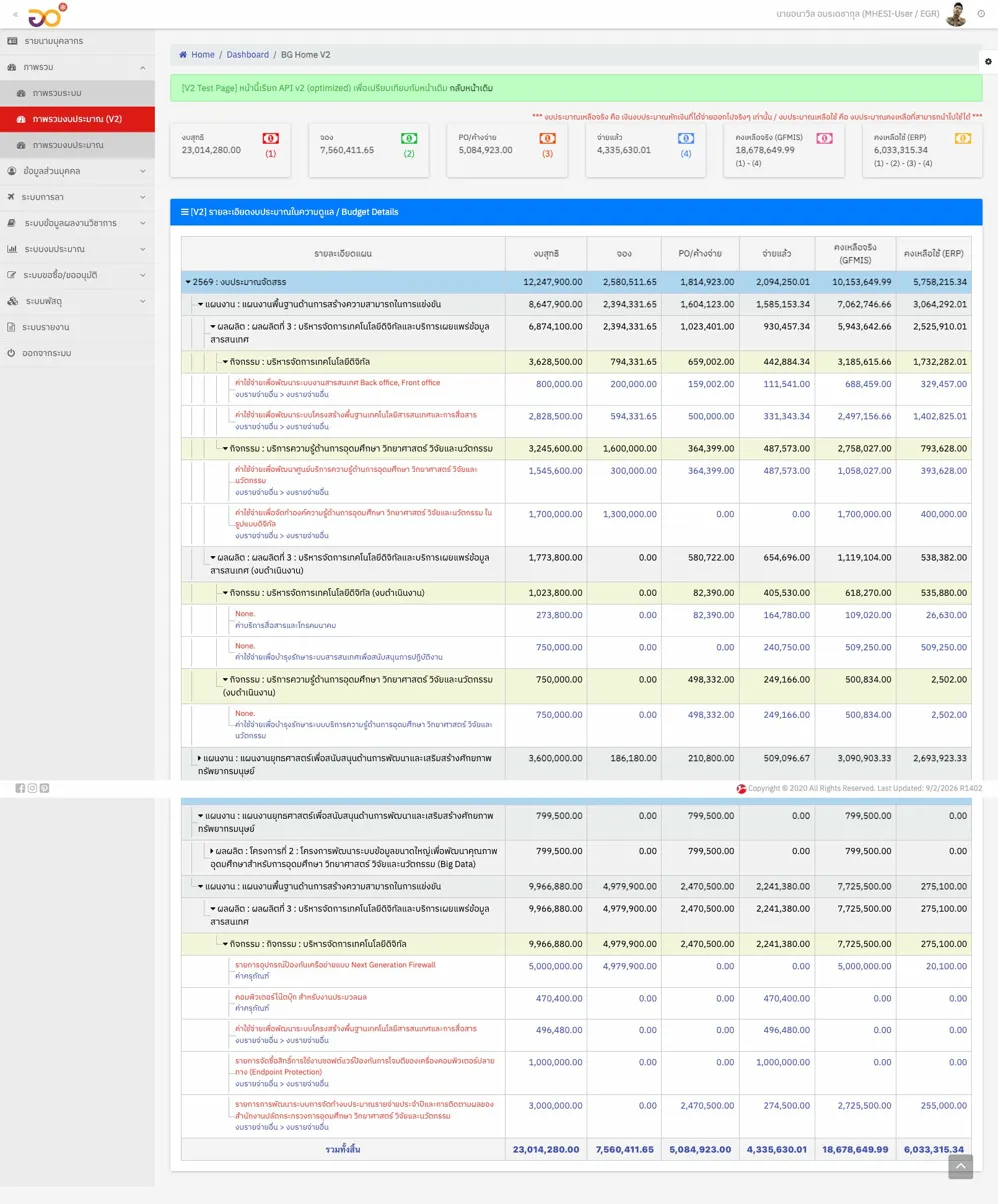
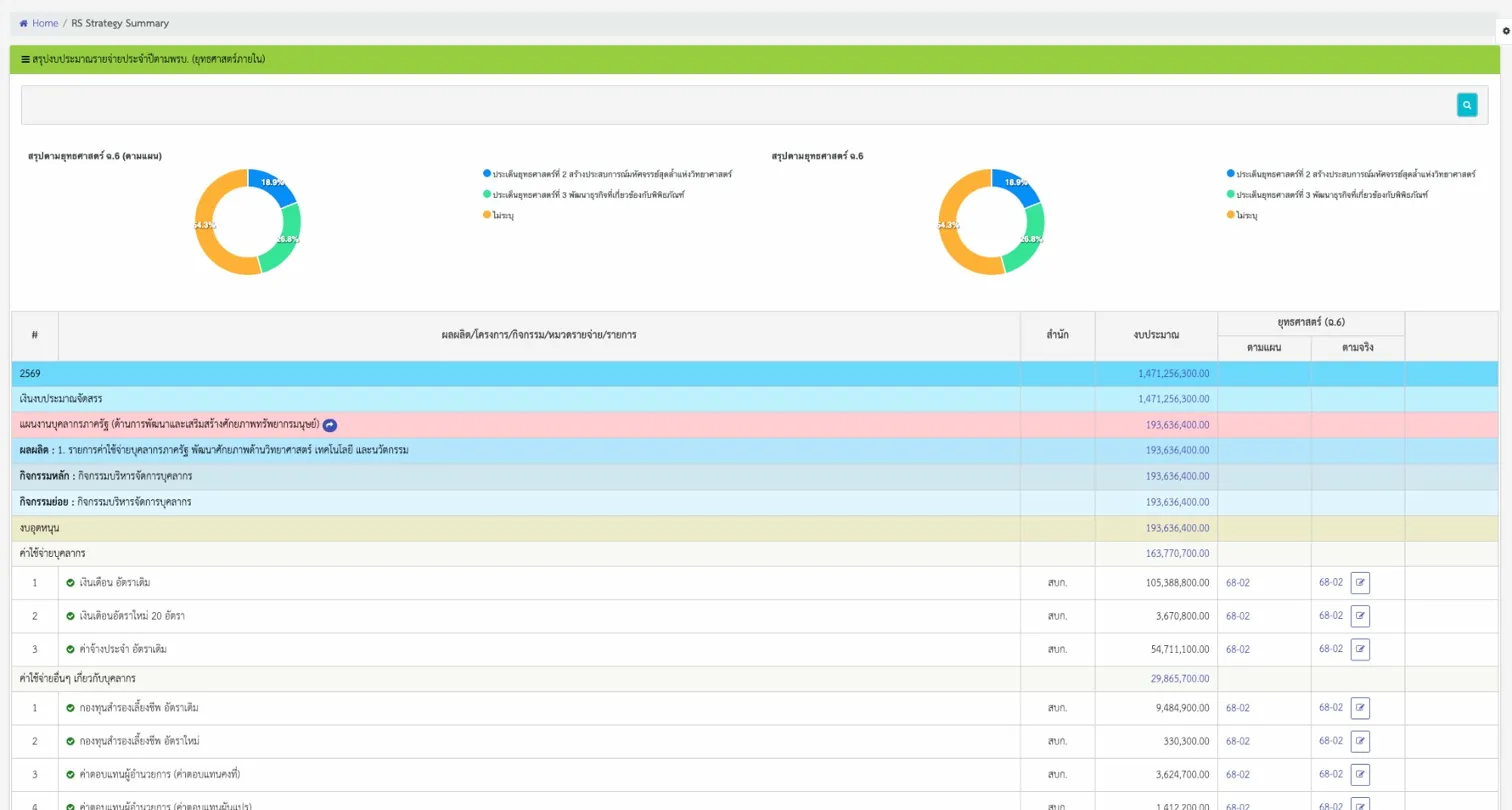
MHESI Budget Dashboard (V2) — Seven-column tracking from gross budget through commitments, POs, payments, to remaining balance
- MHESI Budget Dashboard (V2) — Seven-column tracking from gross budget through commitments, POs, payments, to remaining balance (both GFMIS and ERP), with drill-down to individual activities
- NSM Budget Usage Report (BGU-01A) — KPI cards showing budget utilization percentages across PR, PO, AP/AR, and FI stages, with pie charts for allocation by source and bar charts comparing planned vs. actual spending
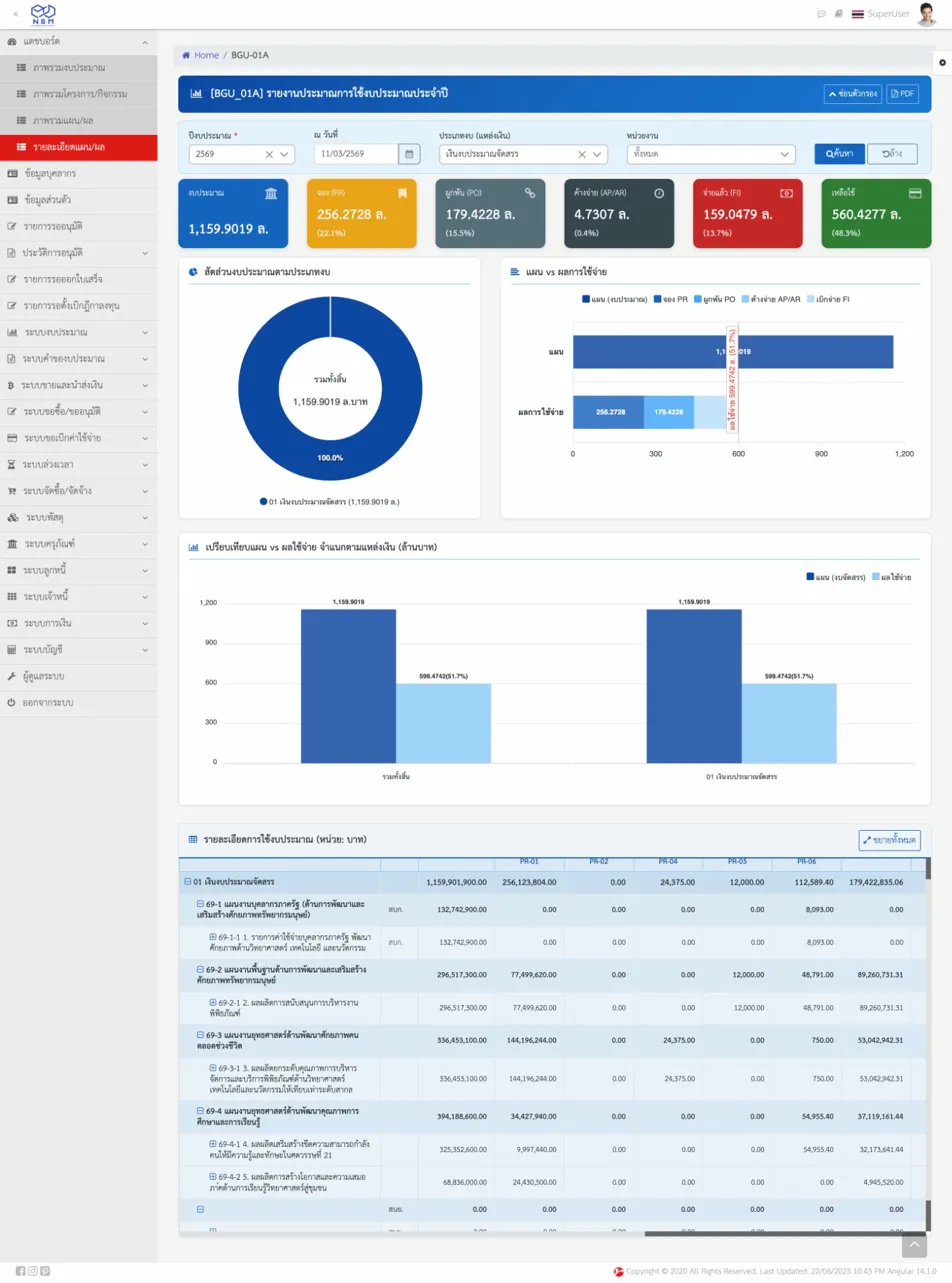
NSM Budget Usage Report (BGU-01A) — KPI cards with pie charts for allocation and bar charts for planned vs. actual spending
Multi-Stage Budget Lifecycle
The system supports the complete Thai government budget lifecycle through distinct workflow stages:
- Budget Request — Departments submit detailed requests
- Draft Appropriation — Planning division reviews and adjusts allocations
- Appropriation Act — Final approved budget with binding allocations
- Budget Adjustment — Mid-year modifications with full audit trail
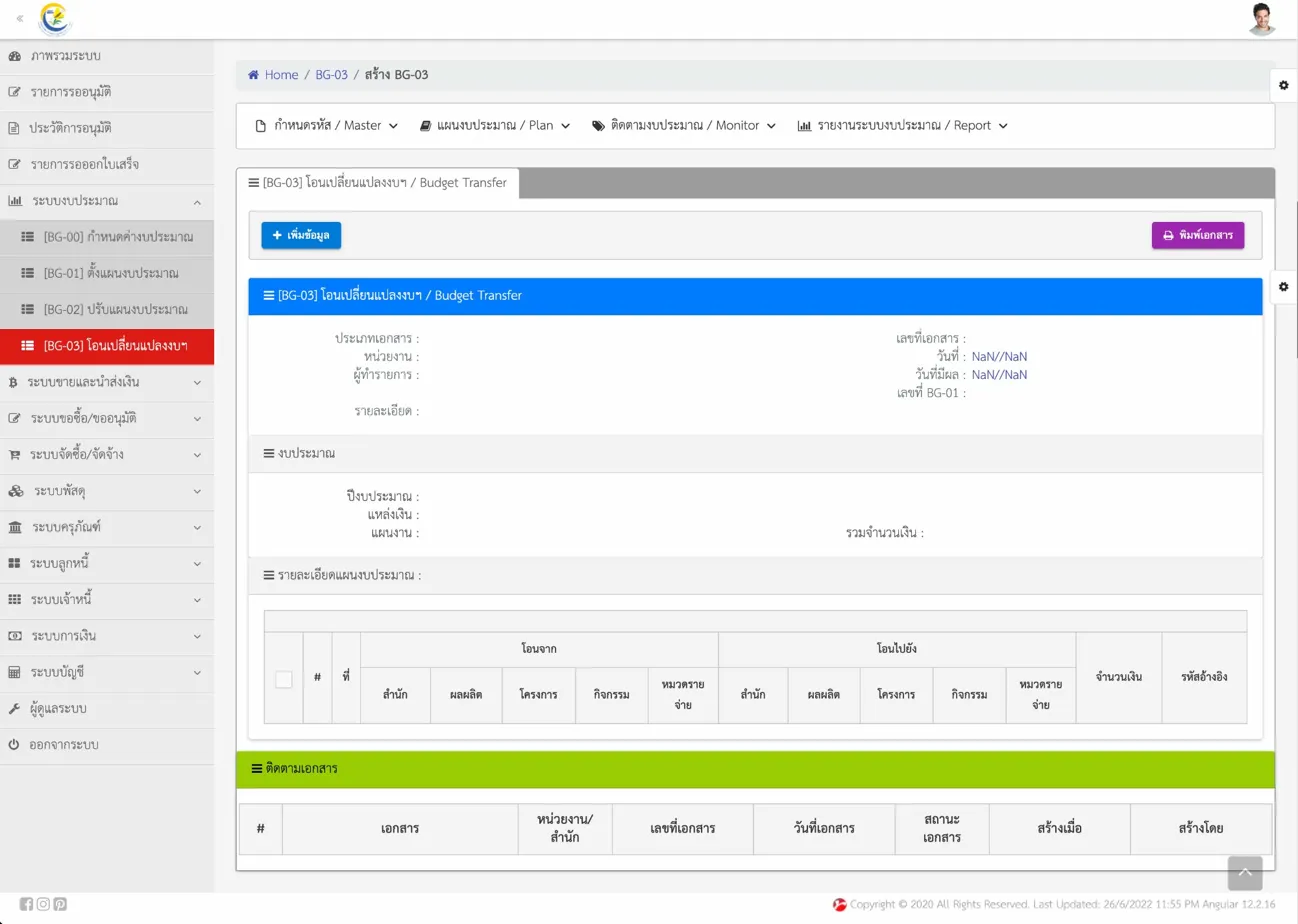
Budget Transfer Form — Mid-year budget adjustment with increases and decreases, color-coded indicators, and percentage change tracking
Each stage has its own interface with appropriate read/write permissions, approval workflows, and consolidated reporting views.
Procurement: End-to-End Document Flow
Saeree ERP implements a complete procurement cycle designed specifically for Thai government purchasing regulations:
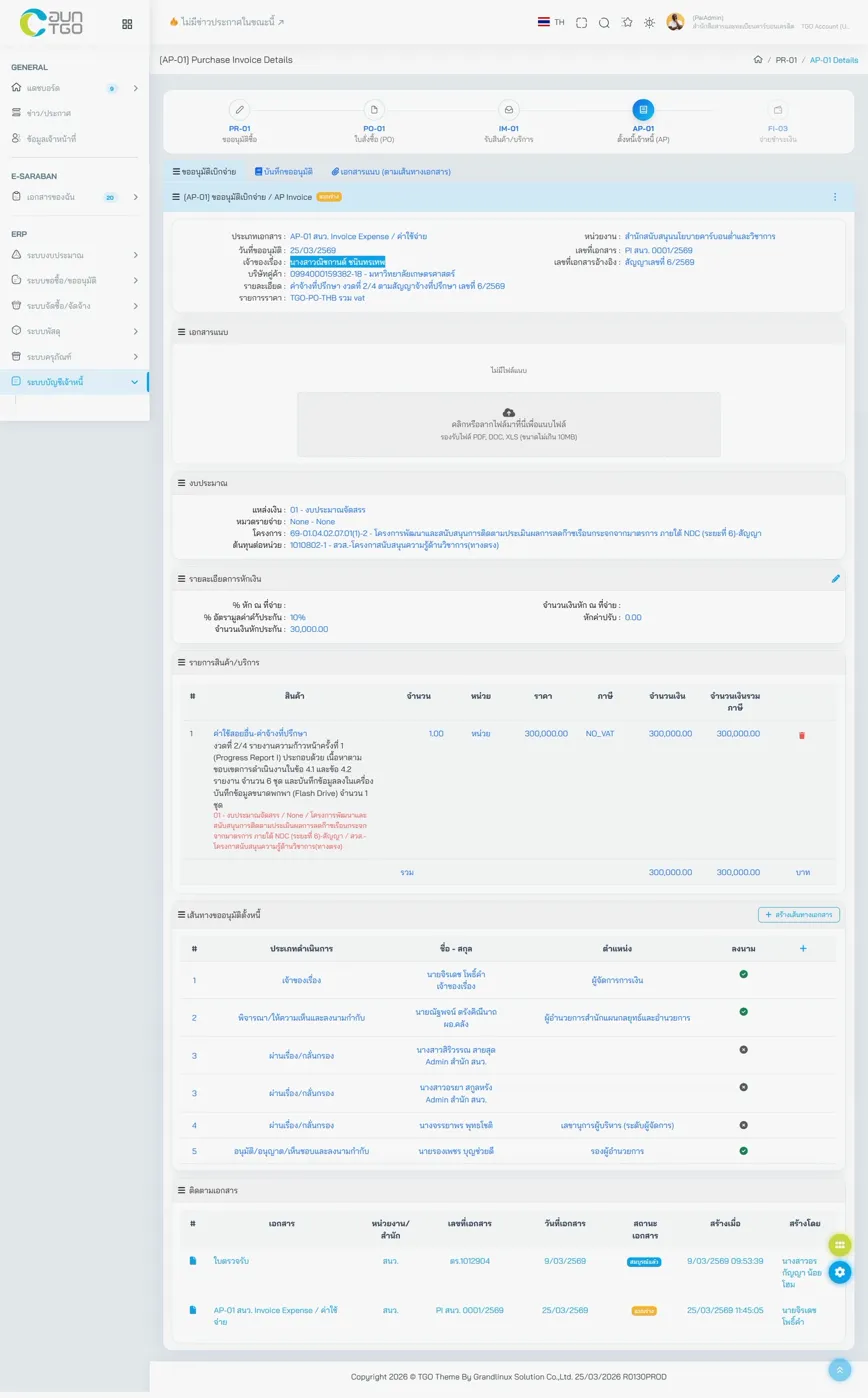
PR-01 (Purchase Request) — Real-time budget availability, item specifications, and committee-based approval routing
- PR-01 (Purchase Request) — Shows real-time budget availability at the moment of request creation, with linked budget plan details, item specifications, committee-based approval routing, and full document tracking
- PR-02 (Travel Budget) — Specialized form for travel expense approvals with per-diem calculations, traveler details, and multi-level approval chains
- PR-04 (Meeting Allowance) — Handles committee meeting compensation with automatic withholding tax calculations, individual payment tracking, and tax certificate generation
- PR-06 (Other Expenses) — Covers non-procurement spending like subscriptions, membership fees, and professional services
- PO-01 (Purchase Order) — Links to purchase requests, displays contract details including guarantees, retention percentages, and advance payments
- IM-01 (Material Receipt) — Goods inspection with customizable inspection committees, transfer of rights tracking, and retention/penalty calculations
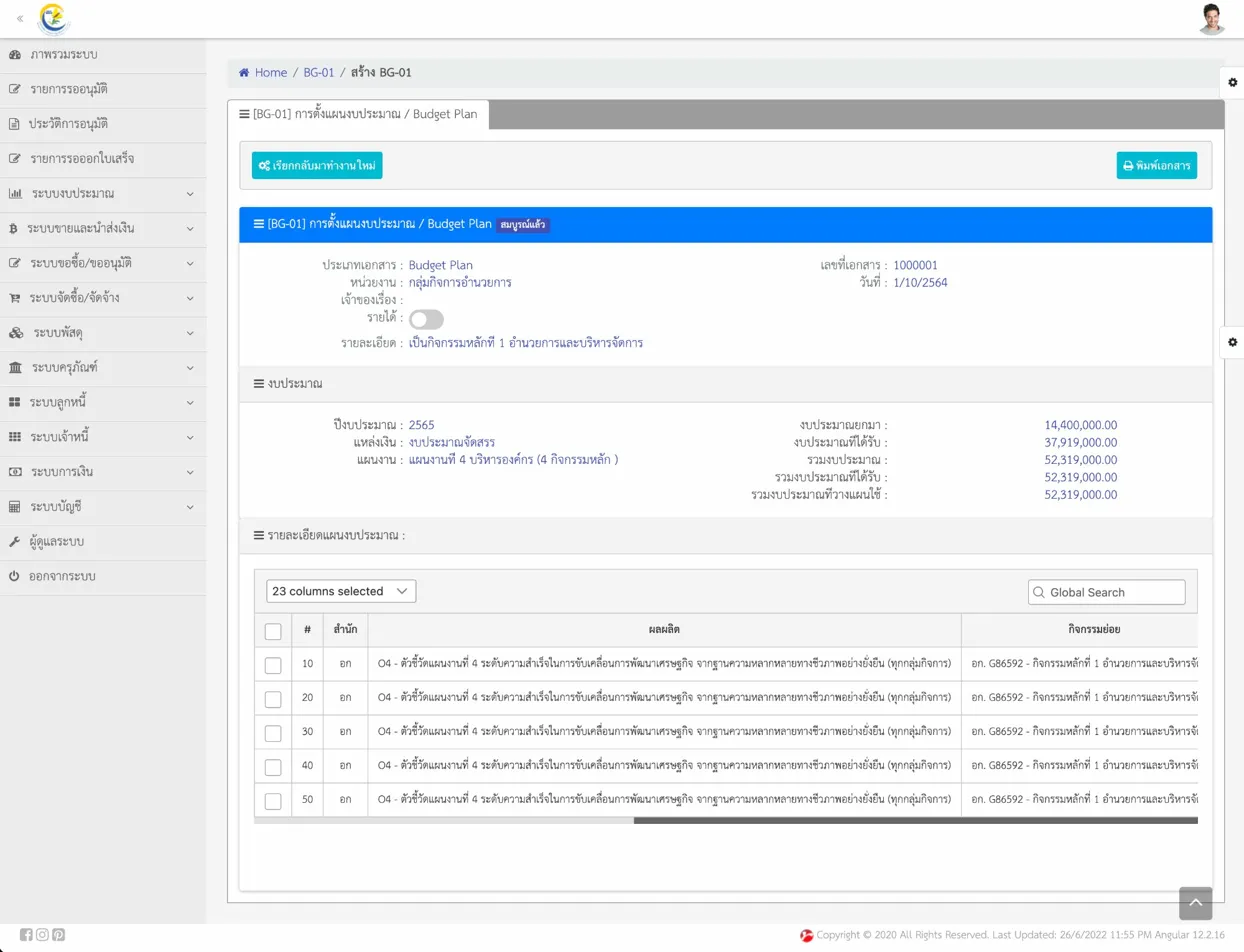
AP-01 (AP Invoice) — Payment approval with complete document trail from PR through PO to receipt, with withholding details and linked accounting entries
Each document type displays its position in the procurement chain (PR → PO → IM → AP → FI) with visual progress indicators at the top of every form. For a deeper understanding of what an ERP system is and how these modules fit together, see our introductory article.
Digital Document Approval (e-Saraban)
One of Saeree ERP's most distinctive features is its integrated e-Saraban (electronic document management) system with digital signatures:
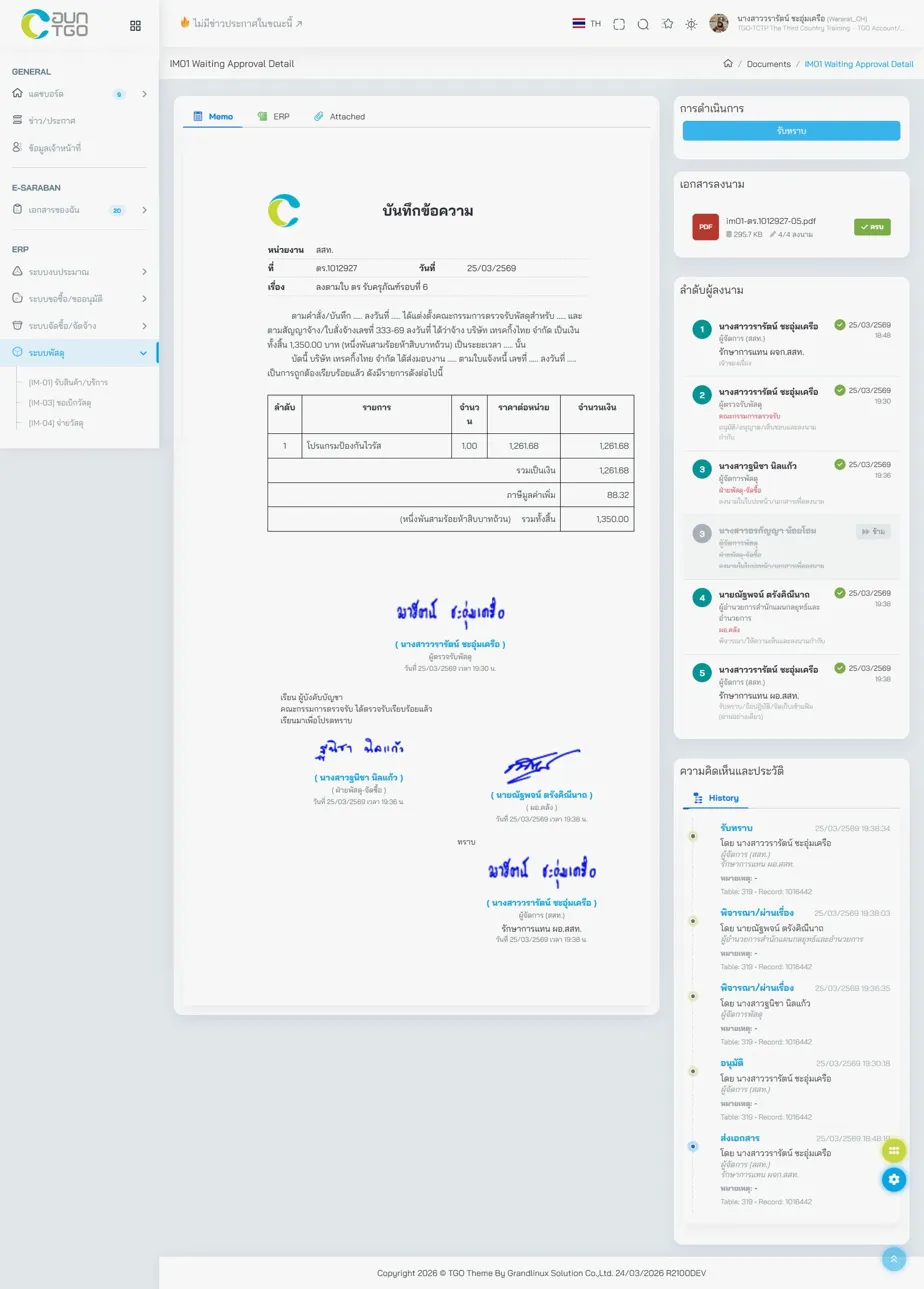
e-Saraban Digital Signature Chain — Up to 5+ signers with timestamps, positions, and signature images displayed inline
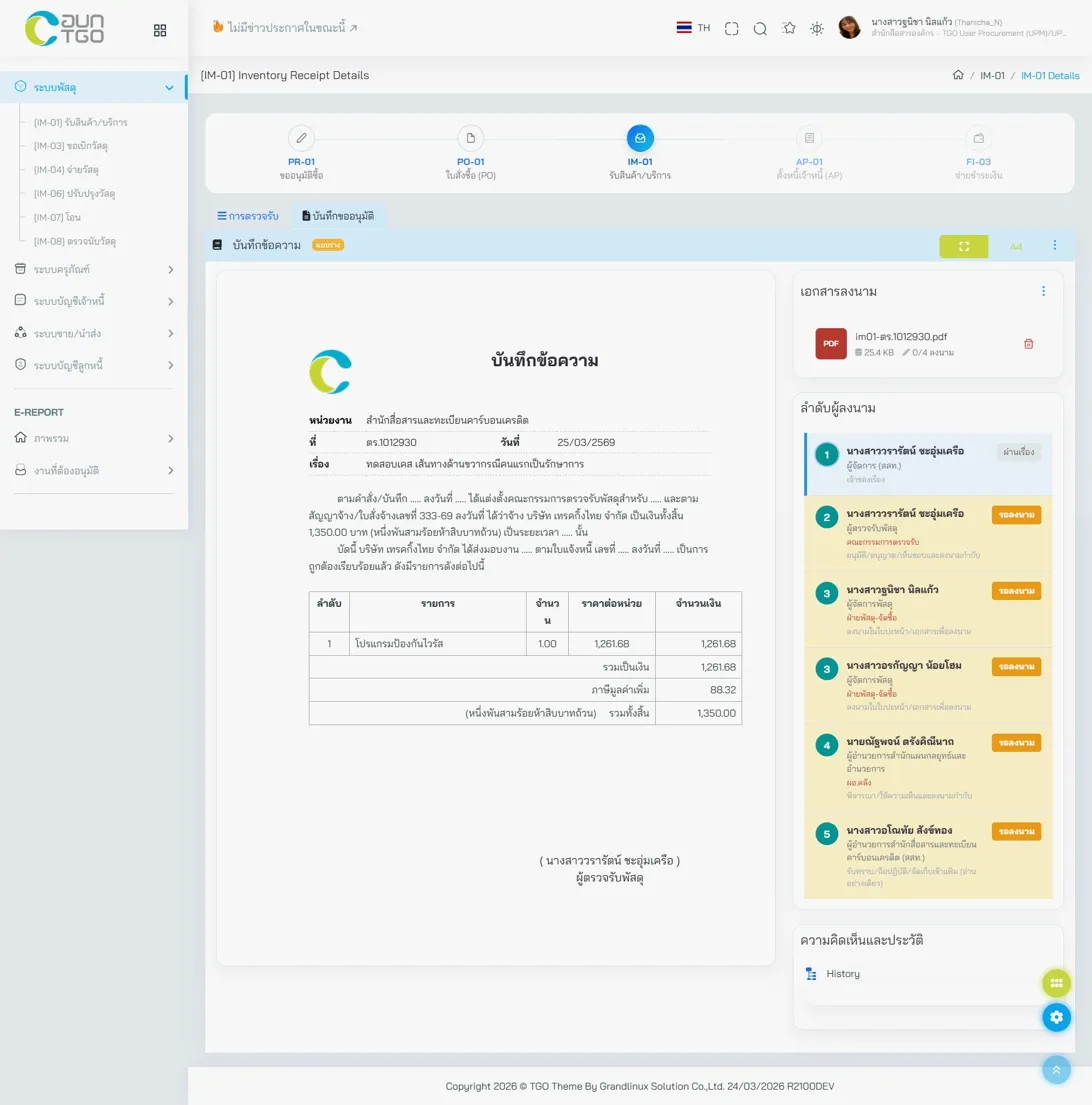
e-Saraban Memo Display — Full Thai government memo format with proper headers, reference numbers, and formatted content
- Memo Display — Full Thai government memo format with proper headers, reference numbers, and formatted content
- Digital Signature Chain — Up to 5+ signers with timestamps, positions, and signature images displayed inline
- Approval History — Complete timeline showing each action (draft, review, forward, approve, receive) with timestamps and responsible persons
- Document Tracking — Cross-references between related documents (PR, PO, contracts) with status badges
This eliminates paper-based approval workflows entirely — a capability that neither Odoo nor iDempiere offers out of the box.
Accounting & Financial Management
Chart of Accounts
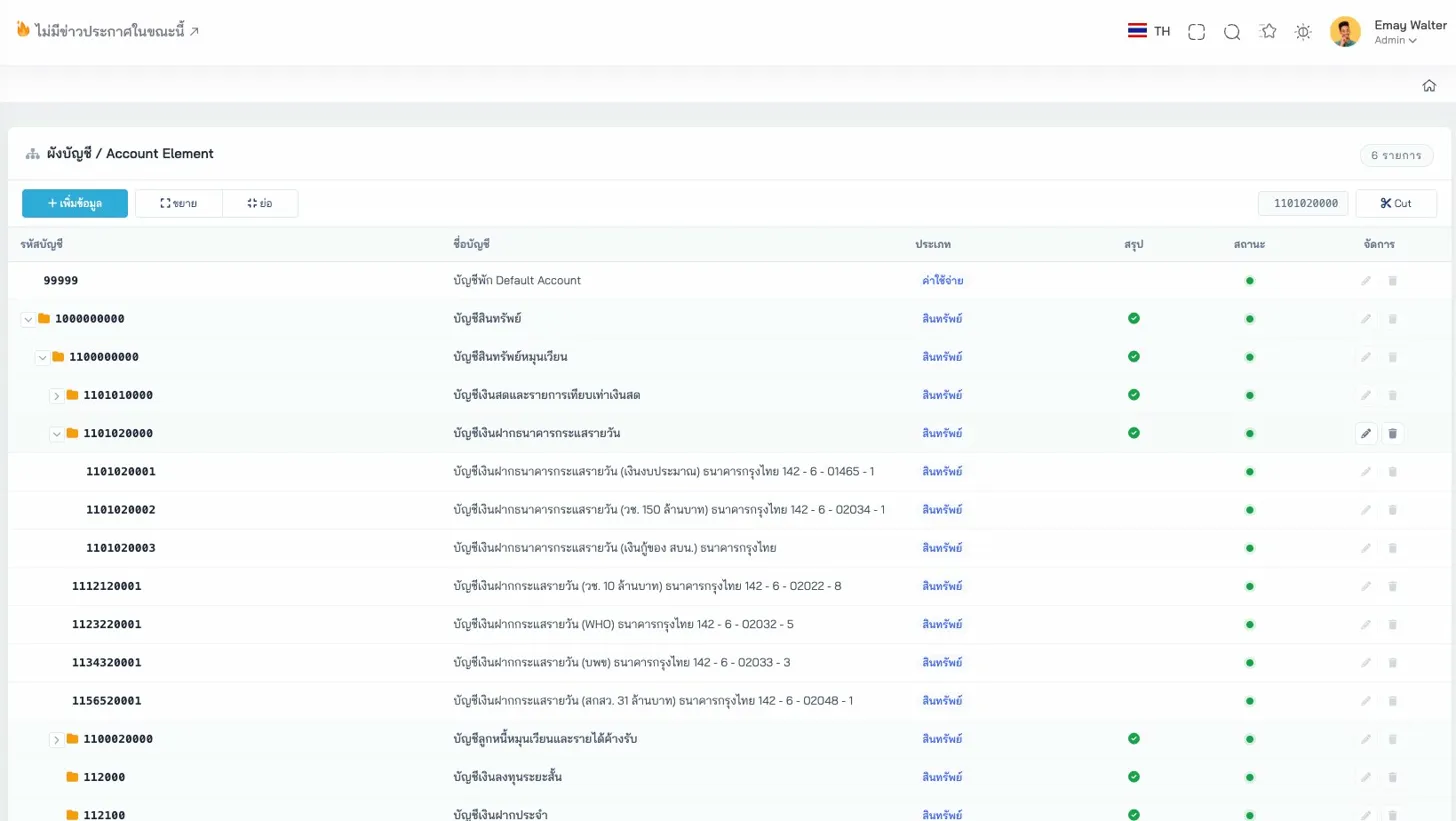
Chart of Accounts — Expandable/collapsible tree navigation with account codes, Thai names, types, and status indicators
The account tree view provides expandable/collapsible navigation through the full chart of accounts with account codes, Thai names, account types, status indicators (active/summary), add/expand/collapse controls, and quick search with account code filtering.
Accounting Schema
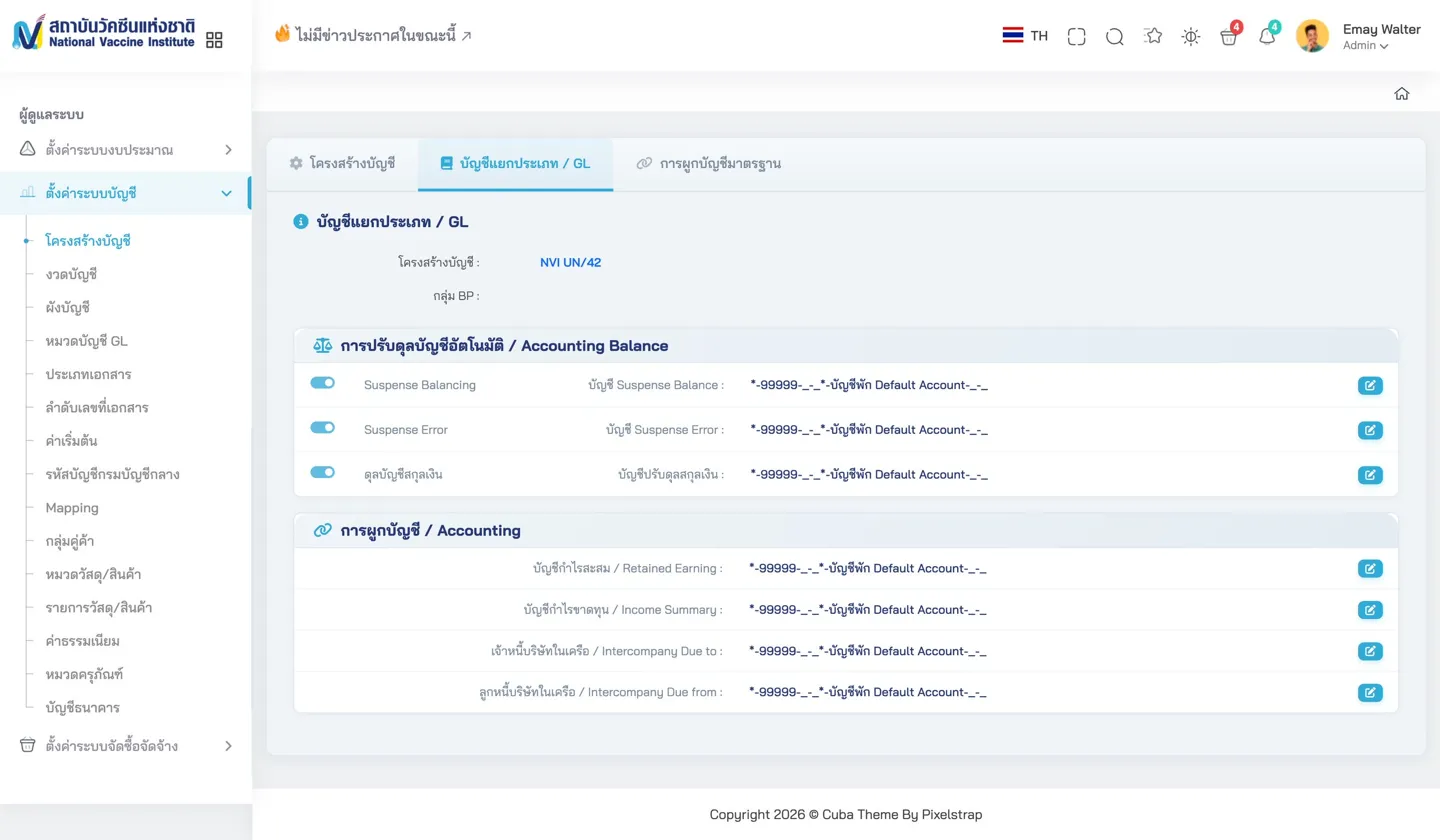
Accounting Schema Balance — Automatic accounting balance settings for suspense, error, and currency balancing accounts
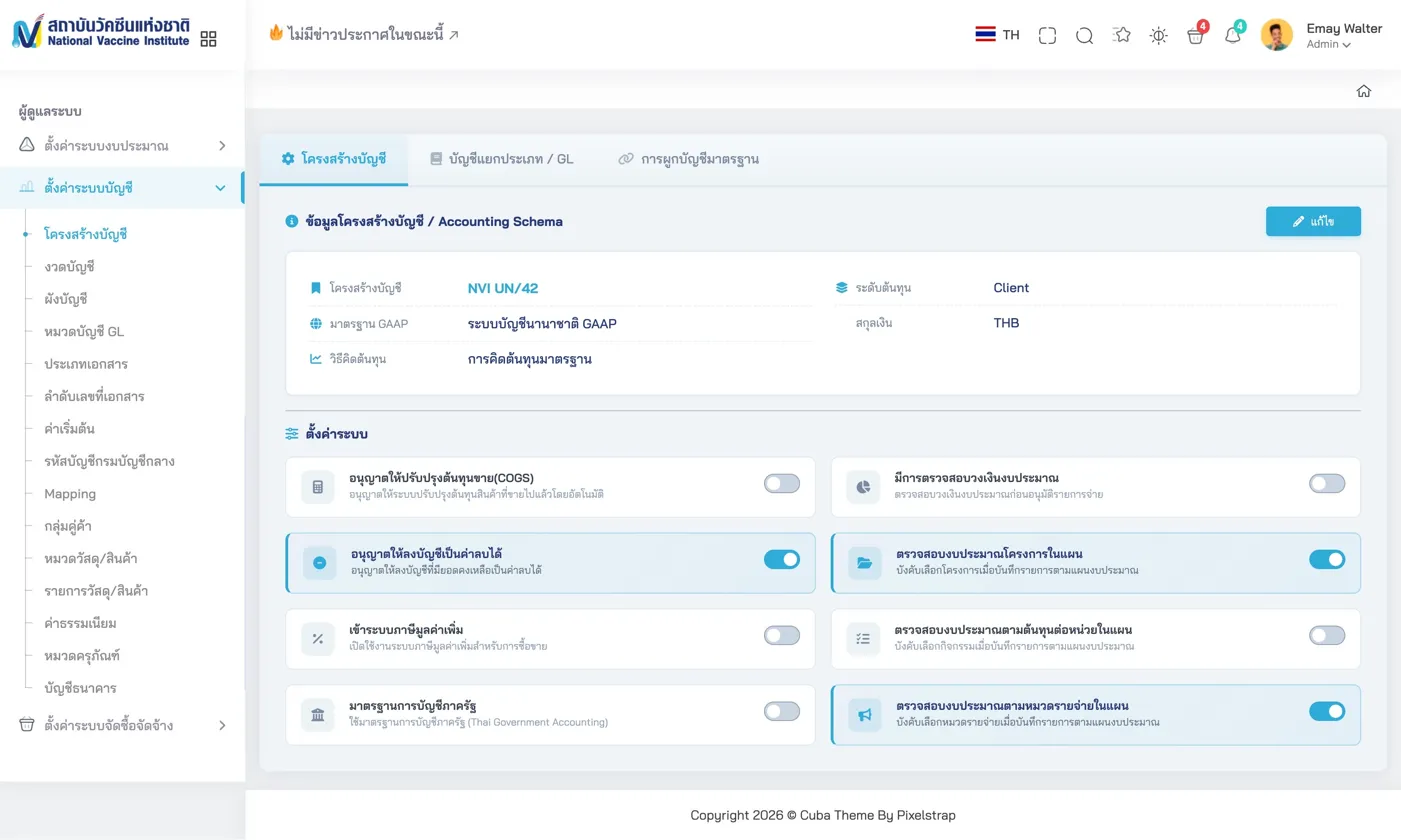
Accounting Schema Settings — GAAP standards (International or Thai Government), currency, cost level, and budget validation toggles
Clean, card-based configuration for GAAP standards (International or Thai Government), currency and cost level settings, toggle controls for budget validation, negative balances, and project-level budget checking, plus automatic accounting balance settings.
Accounting Defaults
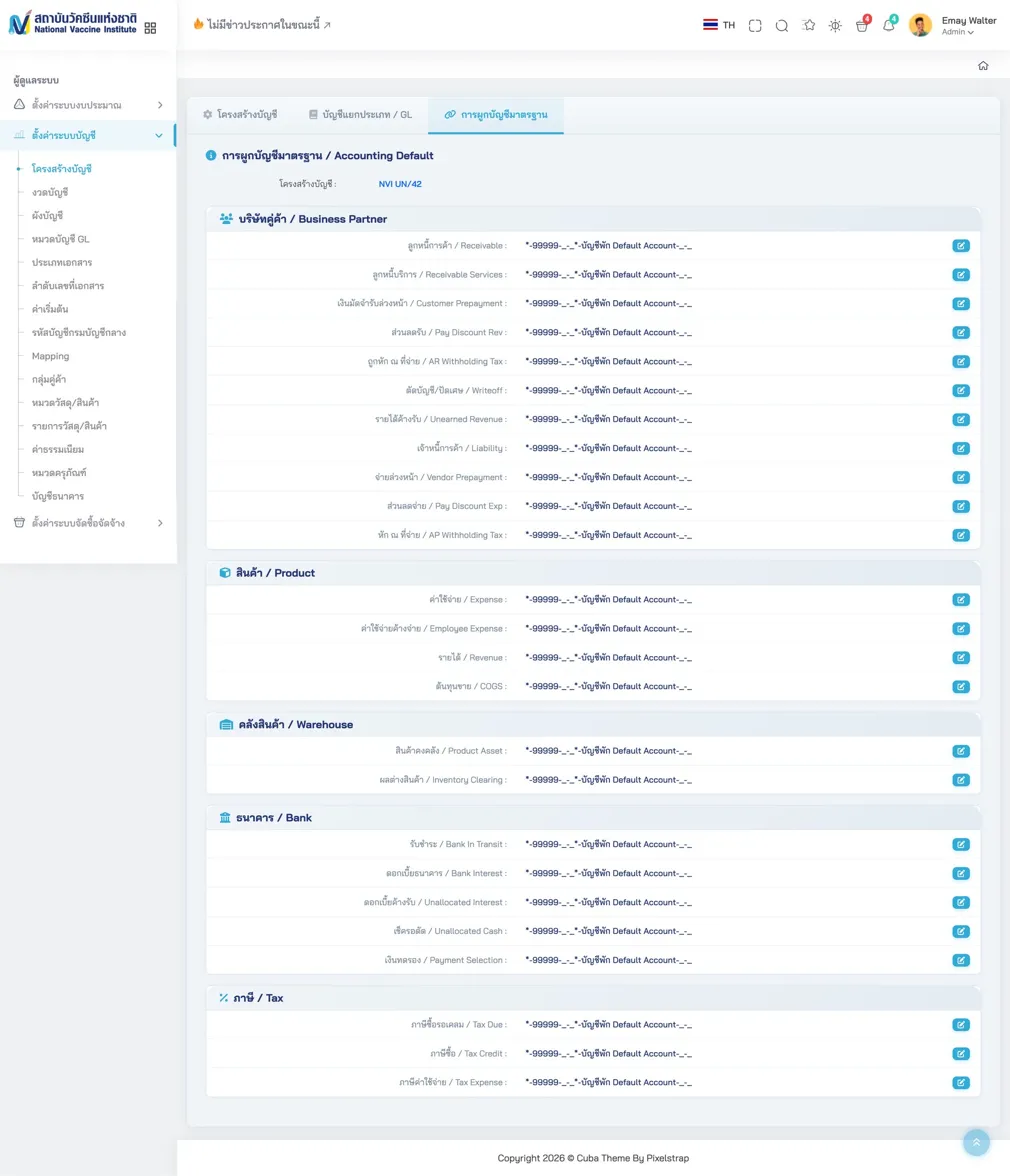
Accounting Defaults — Comprehensive default account mapping organized by category (Business Partner, Product, Warehouse, Bank, Tax) with bilingual labels
Comprehensive default account mapping organized by category (Business Partner, Product, Warehouse, Bank, Tax) with bilingual labels (Thai/English) for every account type.
Human Resource Management
Performance Evaluation
HR Performance Evaluation — KPI scoring with bubble-rating interface (1-5 scale), competency assessment, and weighted summary calculation
The HR module includes a comprehensive performance evaluation system:
- Employee Profile — Photo, department, position, and evaluation period summary
- KPI Scoring — Weighted KPI items with bubble-rating interface (1-5 scale) from multiple evaluators
- Competency Assessment — Service Mind, Creativity, Teamwork, and Organization Support dimensions with multi-rater scoring
- Summary Calculation — Weighted combination of KPI (70%) and Competency (30%) scores with performance level classification
KPI Import & Management
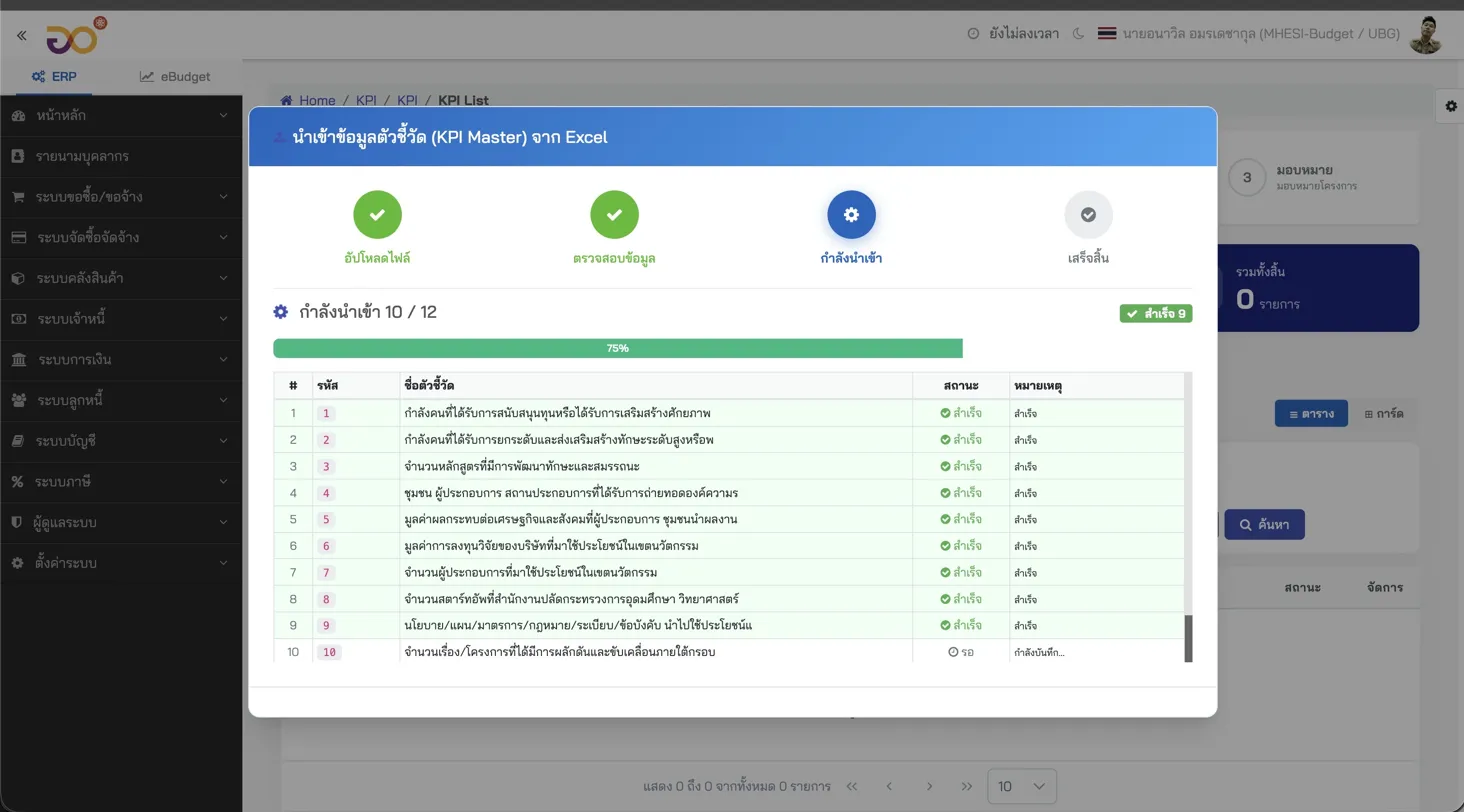
KPI Import Wizard — Step-by-step import (upload, validate, import, complete) with progress tracking and error reporting
For organizations managing large numbers of indicators, Saeree ERP provides an Excel Import Wizard with step-by-step import (upload → validate → import → complete) with progress tracking and error reporting. The MHESI KPI Master demonstrates 12 indicators imported in a single batch with success/failure status per item.
How Does This Compare?
vs. iDempiere
iDempiere, which shares Saeree ERP's ADempiere/Compiere heritage, still uses the ZK framework for its web interface. The iDempiere community acknowledged at their 2025 Budapest conference that UI/UX improvement is a priority — they're discussing potential migration to React or Angular but haven't started. Saeree ERP completed this transition in 2019.
| Feature | Saeree ERP | iDempiere |
|---|---|---|
| Frontend Framework | Angular 20+ with PrimeNG | ZK server-rendered UI |
| UI Style | Modern card-based layouts, interactive charts | Traditional form layouts, limited charting |
| Mobile Optimization | Responsive design | No mobile optimization |
| Government Budget Module | 14-tab budget request, multi-stage lifecycle | Not available |
| e-Saraban / Digital Signatures | Built-in with signature chains | Not available |
vs. Odoo
Odoo (versions 18/19) has invested heavily in UI polish — clean menus, PWA support, and a modern consumer-grade aesthetic. However:
- Budget Management: Odoo has basic budgeting. It cannot handle the Thai government's multi-stage appropriation lifecycle (Request → Draft Act → Appropriation Act → Adjustment) with the level of detail Saeree ERP provides
- Procurement Compliance: Odoo's purchase module follows commercial workflows. Thai government procurement requires committee-based approvals, specific document types (PR-01 through PR-06), and integration with GFMIS
- Digital Signatures: Odoo requires third-party modules. Saeree ERP has built-in e-Saraban with native digital signature chains
- Strategic Alignment: Odoo has no concept of linking budget items to national strategies, ministry objectives, and departmental KPIs — a mandatory requirement for Thai government agencies
- Pricing: Odoo Enterprise charges per user per month. Saeree ERP offers unlimited users with no per-seat licensing — critical for government agencies with hundreds of staff
vs. SAP
SAP can theoretically do everything, but at a cost that makes it impractical for most Thai government agencies. SAP implementations for government typically cost 50-100x more than Saeree ERP and require years of customization to match Thai regulatory requirements that Saeree ERP handles natively. Read our detailed Saeree ERP vs SAP comparison for more.
The Numbers Behind the Interface
| Metric | Value |
|---|---|
| Modules | 16+ |
| Database Tables | 1,000+ |
| Budget Request Tabs | 14 per form |
| Government Clients | 10+ agencies |
| Longest Client Relationship | TGO — 14+ years |
| Frontend Framework | Angular 20+ |
| Component Library | PrimeNG |
| Users per Deployment | Unlimited (no per-seat license) |
A government ERP's user interface isn't about aesthetics — it's about whether civil servants can efficiently manage billions of baht in public funds while maintaining the audit trails and regulatory compliance that public accountability demands.
- Sureeraya Limpaibul, Founder of Saeree ERP
Conclusion
Saeree ERP's interface reflects 25+ years of working directly with Thai government agencies. Every form, every workflow, every validation rule exists because a real agency needed it. That kind of domain-specific depth cannot be replicated by configuring a generic ERP platform.
Whether you're evaluating ERP options for a government agency or simply curious about what a purpose-built government ERP looks like in practice, the screenshots in this article tell the story that feature checklists cannot.
About Grand Linux Solution
Grand Linux Solution Co., Ltd., founded in 2002 by Sureeraya Limpaibul, has over 24 years of experience developing ERP systems for Thai government agencies. The company's founder personally contributed Thai localization to the Compiere project in 1999 — making Thai the 5th language supported, years before the ADempiere fork in 2006.
Contact: 02-347-7730 | sale@grandlinux.com | https://www.grandlinux.com