- 29
- April
Pick up a contract your company signed 3 years ago, open it in Adobe Acrobat, and look at the Signature Panel — does it still show "Signature is valid" in green? If you're not sure, try opening a contract signed 5 years ago.
Many organizations will find yellow or red marks with messages like "Signature validity is unknown", "At least one signature has problems", or "Certificate has expired" — the document still exists, but the signature that proves its authenticity is no longer usable.
This is the problem every organization using Digital Signature must understand — because choosing the wrong signature level today becomes a problem on the day you need the document as evidence — a day when you can't go back and fix it.
This article explains the 4 levels of Digital Signature in PDF per the international standard ETSI EN 319 142-1 (PAdES), so you can choose the right level for each document type and long-term retention.
Why Documents Must Be Kept for 10 Years
Before getting into signature levels, you need to understand how long Thai law requires each document type to be retained.
| Document Type | Retention Period | Legal Reference |
|---|---|---|
| Accounting documents | 10 years | Revenue Code §87 |
| Tax invoices | 10 years | Revenue Code §87/3 |
| Government procurement documents | 10 years | Procurement Act 2017 |
| General contracts | 10 years | Civil & Commercial Code §193/30 |
| Lease contracts | Contract term + 10 years | Civil & Commercial Code |
| Board meeting minutes | Permanent | Public Organization Act |
| AML/KYC documents | 10 years | AML Act |
| BOI documents | 5 + 5 years | Investment Promotion Act |
Why 10 Years?
This number isn't random — it's the longest statute of limitations under Civil & Commercial Code §193/30. It means within 10 years anyone can sue you — and you must have evidence to prove yourself in court.
5 Real Scenarios Requiring Old Documents
- State Audit (สตง.) — Requests documents going back 5-10 years
- Revenue Department audit — Tax audits up to 5 years (10 years in some cases)
- Litigation — Statute of limitations: 10 years
- Internal board audit — Reviewing historical documents
- M&A Due Diligence — Buyer requests all documents
In each scenario — if opening the document shows "unknown" or "expired" signature, it will be hard to use as court evidence, even if the signing was perfectly legal at the time.
The Hidden Problem: Documents That Can No Longer Be Verified
Already-signed digital documents may fail verification due to 3 main causes.
Cause 1: Certificate Expiration
CA certificates typically have a validity of 1-3 years. When expired, signatures using that cert may fail verification.
2023: Company signs contract (cert valid 2023-2025)
2025: cert expires
2027: Sue counterparty, request document for court
→ Open PDF: "Signature validity is unknown"
→ Hard to use as evidence
Cause 2: CA Stops Providing OCSP/CRL Services
Some CAs go out of business or stop providing revocation status checks for old certs. When that happens, verifiers cannot confirm that the signing cert wasn't revoked.
Cause 3: Hash Algorithm Becomes Obsolete
Hash algorithm technology has a lifespan:
- MD5 — broken (deprecated since 2008)
- SHA-1 — deprecated (collision attack 2017)
- SHA-256 — currently safe (may be challenged in the future)
Documents using old algorithms may have their trustworthiness questioned.
Self-Test for Your Organization
Try checking the paperless documents your company signed:
- Open a PDF signed 3 years ago in Adobe Acrobat
- Click the Signature Panel on the left
- Does it show "Signature is valid" in green?
- Try a PDF signed 5 years ago
- Are the results the same?
If the results differ — you are losing legal evidence every day without realizing it.
PDF Signatures Have 4 Standard Levels
Per ETSI EN 319 142-1 (PAdES — PDF Advanced Electronic Signatures), PDF signatures are divided into 4 main levels, plus 1 "non-standard" level that many systems use.
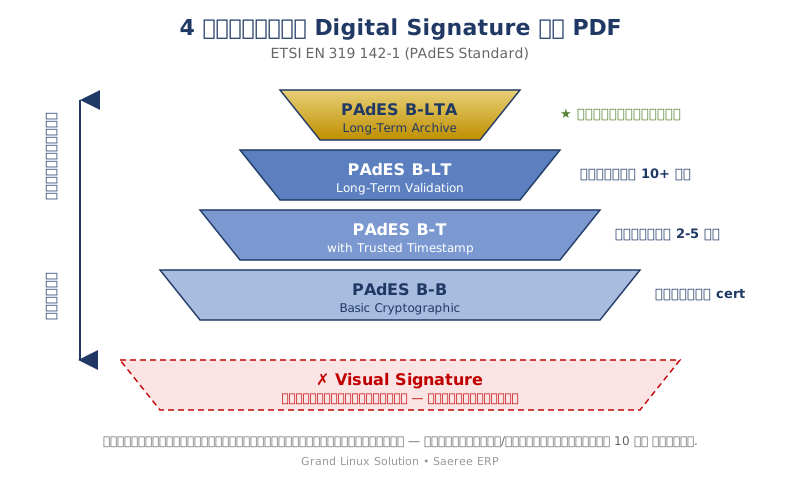
Each level has different components and properties. Read on to understand why higher levels can be retained longer.
Level 0: Visual Signature (Non-Standard)
What it is: A signature image displayed in the PDF document — whether from scanning a real signature, drawing on mobile, or pasting from a file — without any cryptographic signature object inside the PDF.
Anatomy: Why It Differs from Cryptographic Signature
The image below shows that PDFs using Visual Signature and PDFs using Cryptographic Signature look similar on the document page but have completely different internal structures.
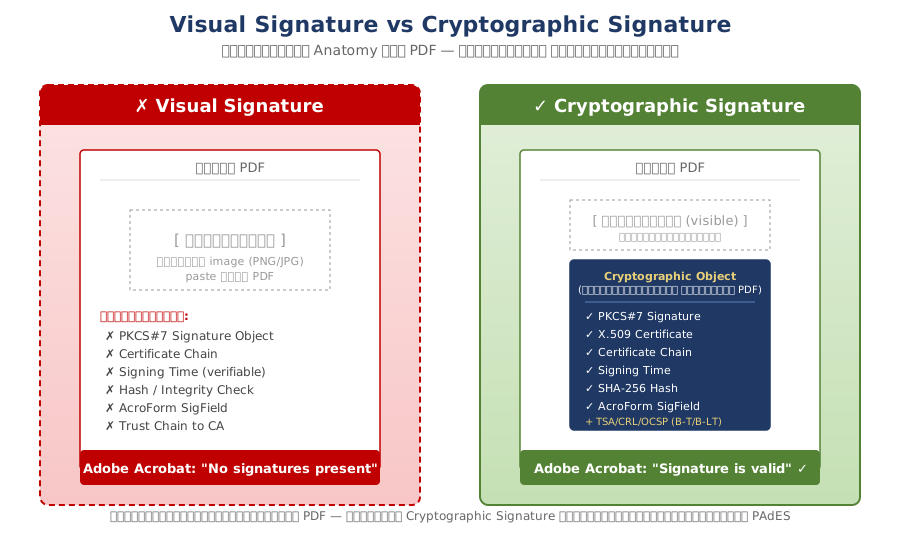
Key differences:
- Visual Signature = just "pixels" in the document, like any other image in PDF
- Cryptographic Signature = has a "PKCS#7 object" embedded in the PDF structure with certificate, hash, timestamp
4 Visual Signature Patterns Common in the Industry
In Thailand, many paperless and ERP systems use Visual Signature but call it "Digital Signature" — categorized into 4 main patterns.
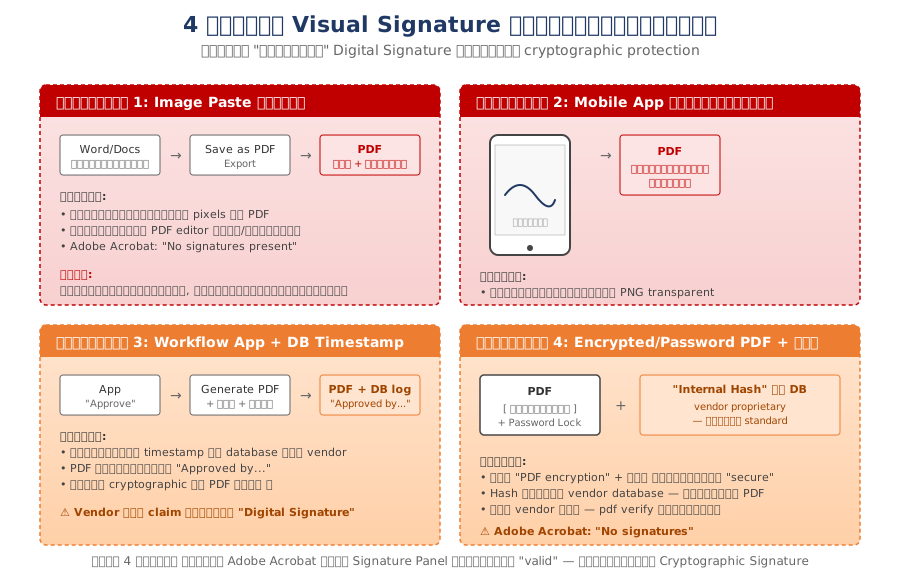
Pattern 1: Direct Image Paste
Use Word or Google Docs to insert a signature image, then save as PDF — the signature image is just an image embedded in the document. Anyone with a PDF editor can delete or edit it.
Pattern 2: Mobile App Signature Drawing
Executive draws signature on mobile screen — app saves as PNG and embeds in PDF as a regular image. No cryptographic binding to identity.
Pattern 3: Workflow App + Database Timestamp
Executive clicks "Approve" in app → system generates PDF with signature image and "Approved by..." text → records timestamp in vendor's database — Vendor often claims this is "Digital Signature" but there's no cryptographic content in the PDF itself.
Pattern 4: Encrypted PDF + Internal Hash
Use "PDF encryption" or "Password-protected PDF" + signature image, then store hash in vendor's own database — not standard, and if the vendor disappears, the document can no longer be verified.
How to Check in Adobe Acrobat (Free)
The easiest way to distinguish Visual vs Cryptographic Signature in your documents is to open in Adobe Acrobat Reader DC and look at the Signature Panel.
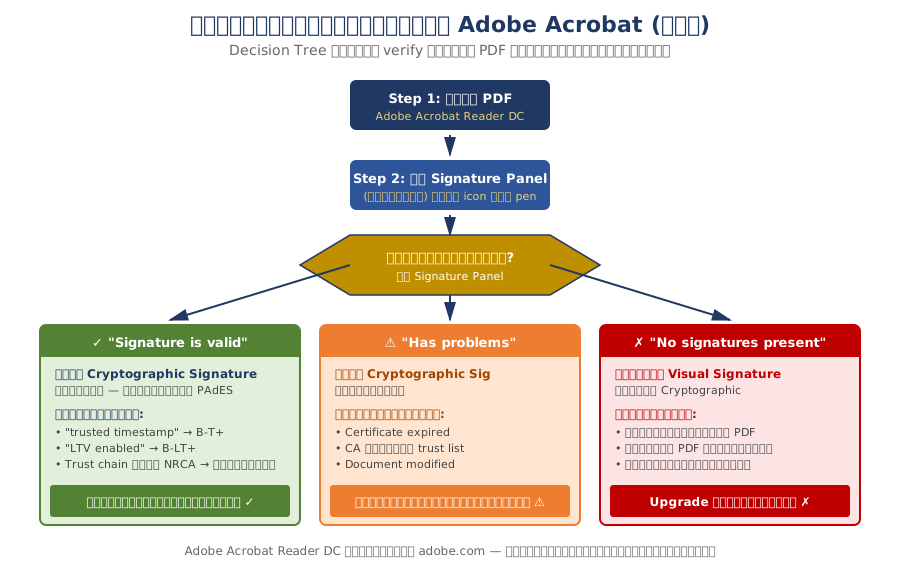
The result tells you immediately:
- ✅ "Signature is valid" = Real Cryptographic Signature — check level next (B-T / B-LT / B-LTA)
- ⚠️ "Has problems" = Cryptographic but with issues (cert expired, untrusted CA, etc.)
- ❌ "No signatures present" = Just Visual Signature — Urgent system upgrade needed
Properties of Visual Signature
- ❌ No cryptographic protection
- ❌ Cannot detect modifications (anyone can delete and paste a new one)
- ❌ No technical binding to signer's identity
- ❌ No trusted timestamp
- ❌ Adobe Acrobat shows "No signatures present"
Thai legal effect: Only Level 1 (General Electronic Signature) per the Royal Decree on Secure Methods for Electronic Transactions B.E. 2553 — has binding effect but the weakest. In court, the counterparty can easily dispute "I didn't sign" or "the document was modified".
Retention period: Unlimited — but no long-term legal value.
Suitable for: Small internal records with no legal effect and short retention.
Level 1: PAdES B-B — Basic Cryptographic
What it is: A signature using PKCS#7 (Public Key Cryptography Standards #7) embedded in the PDF along with the signer's certificate chain.
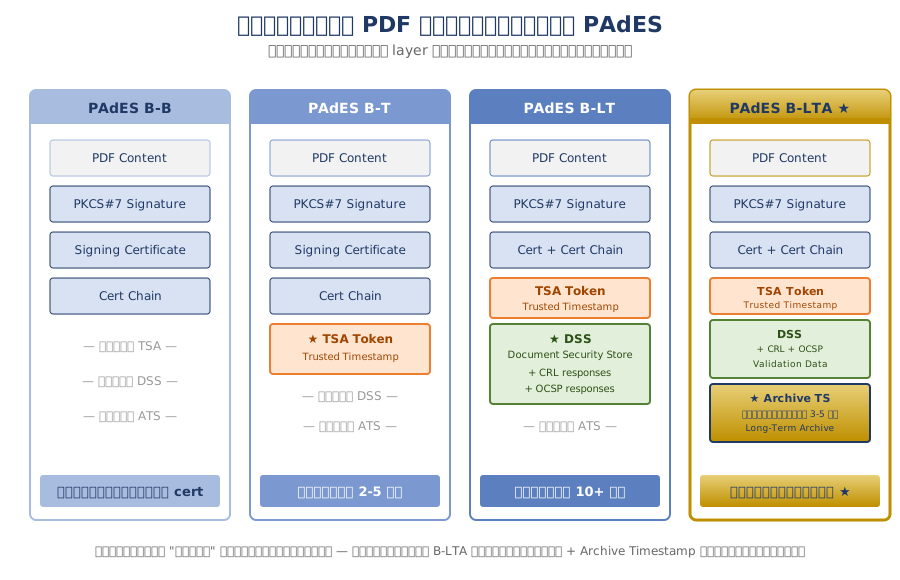
Structure: PDF Content + PKCS#7 Signature + Signing Certificate + Cert Chain (see comparison image of 4 levels below)
Properties:
- ✅ Cryptographic signature that detects modifications
- ✅ Certificate chain embedded (no need to download later)
- ✅ Bound to signer's identity (via X.509 certificate)
- ⚠️ Signing time is the signer's own claim, not a third party's
- ⚠️ Requires online OCSP/CRL service to verify
Thai legal effect: Can be Level 3 (Qualified Electronic Signature) if the cert is from an ETDA-recognized CA — highest binding effect.
Retention period: Per cert validity (typically 1-3 years) — after which verification may fail.
Suitable for: General documents that don't need to be retained beyond the cert lifetime.
Example verification output:
Signature #1:
Field Name: Signer1
Signer Common Name: Sample Company Co., Ltd.
Signing Time: Apr 27 2026 11:15:58
Signing Hash Algorithm: SHA-256
Signature Type: adbe.pkcs7.detached
Signature Validation: Signature is Valid.
Level 2: PAdES B-T — Adds Trusted Timestamp
What it is: B-B + timestamp token from a Trusted Time Stamping Authority (TSA) embedded in the signature.
Structure: Everything in B-B + TSA Token (TSA Cert + Signed time + Hash)
Additional properties beyond B-B:
- ✅ Proves signing time via third party
- ✅ Prevents backdating claims in court
- ✅ Prerequisite for B-LT and B-LTA
TSAs available in Thailand:
- ETDA TSA:
https://timestamp.etda.or.th/tsa(free for government agencies) - Commercial TSA from qualified providers
Thai legal effect: Same as B-B but with stronger proof of time.
Retention period: 2-5 years — TSA cert also has limited validity.
Suitable for: Documents requiring proof of time, e.g., contracts with expiry dates, tender deadlines.
Example output:
Signature #1:
...
Timestamp: Yes
TSA: Electronic Transactions Development Agency
Time: Apr 27 2026 11:15:58 +0700 (verified)
Level 3: PAdES B-LT — Long-Term Validation
What it is: B-T + embedding CRL (Certificate Revocation List) and OCSP responses into the PDF's DSS (Document Security Store).
Structure: Everything in B-T + DSS (CRL responses + OCSP responses + Validation data)
Additional properties beyond B-T:
- ✅ Verifies even after cert expires
- ✅ Verifies offline (no need to connect to CA)
- ✅ Resilient to CA shutting down in the future
Why it matters:
↓
cert expires in 2027
↓
Adobe requests CRL/OCSP to verify
↓
CA may not have responses for old cert anymore
↓
✗ Verification fails
B-LT solution:
↓
Embed CRL/OCSP at signing time
↓
In 2027, verify by reading from PDF
↓
✓ Verification passes (offline)
Thai legal effect: Strong Level 3 for long-term retention.
Retention period: 10-15 years — but if TSA cert loses trust, there may be issues.
Suitable for: Accounting documents, general contracts, AIP/PR/PO that must be kept 10 years.
Level 4: PAdES B-LTA — Long-Term Archive ★
What it is: B-LT + Archive Timestamp that can be renewed every 3-5 years to extend trustworthiness indefinitely.
Structure: Everything in B-LT + Archive Timestamp (covers signature + existing DSS + new TSA Token), which can be added again every 3-5 years.
Comparison of All 4 Level Structures
The image below shows that each level "adds" a layer over the previous one — not replacing it.
Additional properties beyond B-LT:
- ✅ Renewable indefinitely — chain of archive timestamps
- ✅ Protects against TSA cert expiration
- ✅ Protects against hash algorithm obsolescence (re-archive with new algorithm)
- ✅ Verifies forever as long as renewed before each round expires
Archive Timeline: Sign in 2026 → Renew Archive TS #1 in 2029 → #2 in 2033 → #3 in 2037 → continuing on...
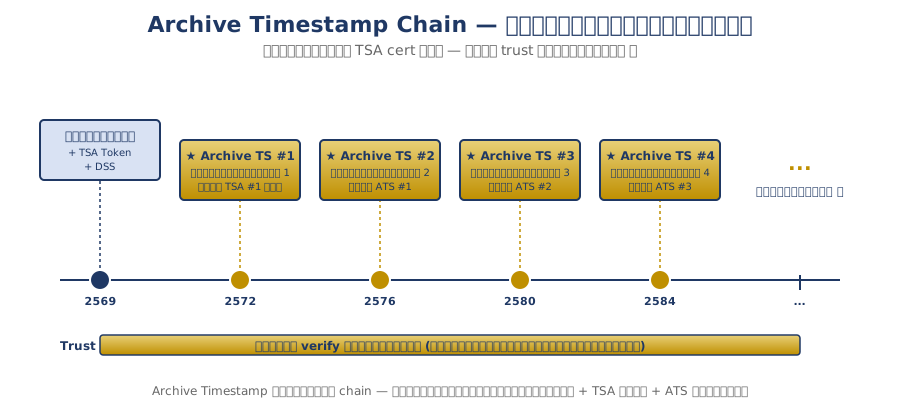
Thai legal effect: Highest Level 3 — usable in court and audits at every level.
Retention period: Unlimited.
Suitable for: 10+ year contracts, financial documents, board reports, permanent documents, AML records.
Comparison Table of 4 Levels + Visual
| Feature | Visual | B-B | B-T | B-LT | B-LTA |
|---|---|---|---|---|---|
| Cryptographic Signature | ❌ | ✅ | ✅ | ✅ | ✅ |
| Certificate Chain | ❌ | ✅ | ✅ | ✅ | ✅ |
| Trusted Timestamp | ❌ | ❌ | ✅ | ✅ | ✅ |
| Embedded CRL/OCSP | ❌ | ❌ | ❌ | ✅ | ✅ |
| Archive Timestamp | ❌ | ❌ | ❌ | ❌ | ✅ |
| Verify offline | ❌ | ❌ | ❌ | ✅ | ✅ |
| Verify after cert expires | ❌ | ❌ | ❌ | ✅ | ✅ |
| Verify forever | ❌ | ❌ | ❌ | ❌ | ✅ |
| Retention period | No legal value | 1-3 years | 2-5 years | 10-15 years | Unlimited |
How to Choose the Right Level for Your Documents
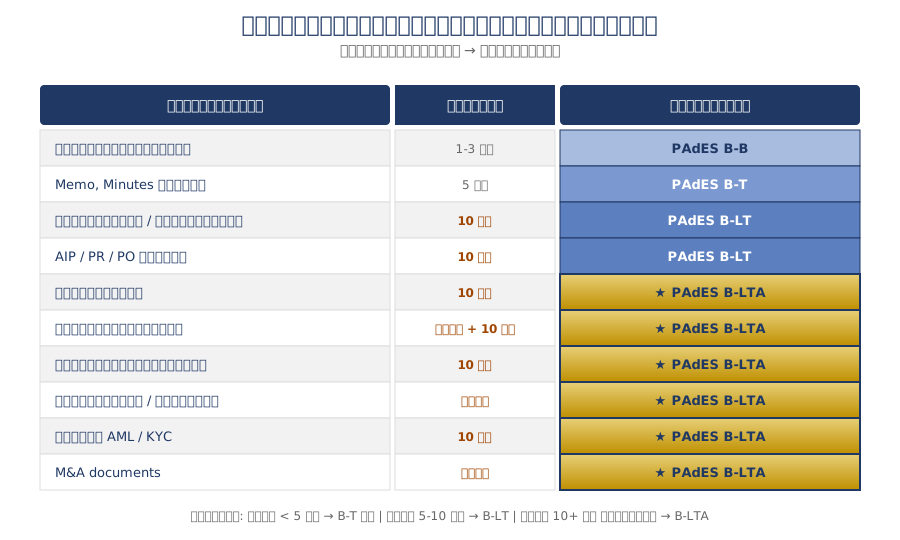
Guide table for choosing signature level by document type:
| Document Type | Minimum Level | Recommended Level |
|---|---|---|
| General internal records | Visual | B-B |
| Memos, general minutes | B-B | B-T |
| Accounting documents | B-T | B-LT |
| Tax invoices | B-T | B-LT |
| Government AIP/PR/PO | B-LT | B-LT |
| Business contracts | B-LT | B-LTA |
| Long-term lease contracts | B-LTA | B-LTA |
| Government procurement | B-LT | B-LTA |
| Board reports | B-LTA | B-LTA |
| AML documents | B-LT | B-LTA |
| M&A documents | B-LTA | B-LTA |
| Permanent documents | — | B-LTA |
Simple rule of thumb:
- Documents kept < 2 years → B-B is enough
- Documents kept 2-5 years → B-T
- Documents kept 5-10 years → B-LT
- Documents kept 10+ years or permanent → B-LTA
How to Check Your ERP System
Use this 8-point checklist to inspect documents your system has signed.
Basic Level
- ☐ Open signed PDF in Adobe Acrobat
- ☐ Click Signature Panel
- ☐ Does it show "Signature is valid" in green?
B-T Level (Trusted Timestamp)
- ☐ Has clearly indicated "trusted timestamp"
- ☐ TSA name appears (e.g., ETDA or qualified TSA)
B-LT/B-LTA Level (Long-term)
- ☐ Shows "Signature is LTV enabled"
- ☐ Disconnect internet and verification still passes
Trust Chain Level
- ☐ Trust path leads to ETDA-recognized Root CA (e.g., NRCA — Thailand National Root CA)
pdfsig sample.pdf on Linux/Mac to see all details.
If you answer ❌ to even one item — your system isn't fully meeting that level's standard, and previously-signed documents may fail verification in the future.
Important Note: Systems Using "Visual Signature" Are Not Digital Signature
In the Thai ERP and paperless industry, many systems advertise having "Digital Signature" but in reality use only Visual Signature (signature image pasted onto PDF), with no cryptographic protection at all.
Easy verification:
↓
If you only see a signature image but no Signature Panel
↓
Or Signature Panel shows "No signatures"
↓
= Just Visual Signature
= Not technically Digital Signature
These systems:
- ❌ Cannot detect document modifications
- ❌ Not bound to signer's identity
- ❌ Hard to use as court evidence
- ❌ Don't comply with Electronic Transactions Act §9 at the Qualified level
Before deciding to buy a system — ask the vendor to demo verification in Adobe Acrobat to confirm it's a real Digital Signature, not just Visual.
Questions to Ask Vendors
If considering a new ERP/paperless system, use these questions:
Signature Level
- What signature does the system use — Visual / B-B / B-T / B-LT / B-LTA?
- Which CA issues the certificates? Is it ETDA-recognized?
- Does the trust chain reach the Thai Root CA (NRCA)?
Long-term
- If the cert has expired, can previously-signed documents still be verified?
- Does the system support 10-year document retention per the Office Records Regulation No. 4 B.E. 2564?
- Does it have automatic Archive Timestamp renewal?
Verification
- Demo opening a document in Adobe Acrobat — does it show "LTV enabled"?
- Is there a Public Verification Portal for external parties to verify?
Answers to Watch Out For
- ❌ "Our signature is secure, uses AES-256" → AES is encryption, not signature
- ❌ "Once signed, can verify forever" → If PAdES profile not specified = may not be true
- ❌ "Our system is better than competitors" → Ask for verifiable technical proof
Upgrade Roadmap for Organizations
If your current system is at B-B level and you want to move up, you can do it phased:
| Phase | From → To | Effort | Impact |
|---|---|---|---|
| Phase 1 | B-B → B-T | 1-2 weeks | + Trusted timestamp |
| Phase 2 | B-T → B-LT | 3-5 weeks | + Verify offline |
| Phase 3 | B-LT → B-LTA | 1 week | + Verify forever |
| Phase 4 | Migration | 3-6 months | Upgrade old documents |
Each phase can be deployed separately without affecting already-signed documents — progressive enhancement.
Action Items for Today
For executives and IT directors:
- Audit already-paperless documents — open old PDFs in Adobe Acrobat and check whether the signature is still valid
- Identify document types and required retention — use the table in "Why 10 Years"
- Set organizational minimum standards — what document types need which signature level
- Audit current ERP system — use the 8-point checklist
- Plan upgrade roadmap — gradually upgrade by importance
Conclusion
Documents signed today are evidence for tomorrow. A good ERP system isn't just one that signs — it must store, verify, and meet the legal retention period.
— Saeree ERP Team
Whatever signature level you choose, choose with information — because the wrong choice today cannot be fixed on the day you need the document as evidence.
About Saeree ERP
Saeree ERP by Grand Linux Solution currently implements Digital Signature at PAdES B-B level with INET-CA Trust Chain at TGO for over 5 years, and is upgrading to PAdES B-LTA in 2026 — the highest level of the PAdES standard today, with continued evolution to meet upcoming standards in the future.
2026 Development Roadmap
- Q2 2026: Upgrade to PAdES B-T (Trusted Timestamp via ETDA TSA)
- Q3 2026: B-LT (Embedded CRL/OCSP for 10-year documents)
- Q4 2026: B-LTA (Archive Timestamp for permanent documents)
- 2027: ETDA Conformance Assessment
Related articles: Paperless Checklist: 10 Essentials for Thai Government Organizations and Where to Store PDF Files in Your ERP Safely: 3 Approaches and 3 Types of Electronic Signatures Under the Electronic Transactions Act
Appendix: Technical Terms to Know
| Term | Meaning |
|---|---|
| PAdES | PDF Advanced Electronic Signatures (ETSI EN 319 142-1) |
| PKCS#7 | Public Key Cryptography Standards #7 — signature format used in PDF |
| CA | Certificate Authority — organization that issues digital certificates |
| NRCA | Thailand National Root Certification Authority — Thai Root CA operated by ETDA |
| TSA | Time Stamping Authority — issuer of trusted timestamp per RFC 3161 |
| CRL | Certificate Revocation List — list of revoked certs |
| OCSP | Online Certificate Status Protocol — checks cert status online |
| DSS | Document Security Store — PDF structure storing validation data |
| LTV | Long-Term Validation — ability to verify after long time has passed |
| ETDA | Electronic Transactions Development Agency (Thailand) |
This article is based on experience implementing Digital Signature systems in ERP for Thai government organizations. For consultation on Digital Signature in your organization, contact sale@grandlinux.com or 02-347-7730