- 20
- February
Waiting until month-end to know how much budget remains — if your organization still works this way, it means your system "can't keep up" with modern management demands. The recurring problem executives face is waiting for the finance department to compile figures, data scattered across multiple systems and Excel files, and most importantly — not knowing where funds are stuck between reservation, commitment, or actual payment. This article explains how a real-time budget dashboard solves these problems.
Why Real-Time Budget Tracking Matters
Medium to large organizations typically have multiple bureaus and departments, each spending independently according to their budget plans — yet senior executives lack tools to see a real-time overview of how much each unit has spent and how much remains.
- With multiple bureaus and departments spending independently, a centralized tool is needed to consolidate data into a comprehensive overview
- Waiting for month-end data means you may have already overspent without knowing, because the data represents "the past," not "the present"
- Executives need data "as of right now," not "as of last month-end," to make timely decisions
- Budget transfers require knowing the actual remaining balance before approval — if data is not current, you may transfer funds that have already been spent
Is your agency still running this on Excel and paper?
Saeree ERP is built around Thai public-sector rules — 3 fund sources · reserve/commit/accrue · fixed assets · procurement · memo-style approvals
The 6 Budget Status Fields — The Heart of the Dashboard
A good budget dashboard must display the status of funds at every stage — not just "allocated" and "spent." You need to see where money is in transit — from planning all the way to actual payment, as follows:
| Field | Meaning | Triggered When |
|---|---|---|
| Plan | The total budget in that plan, as allocated under the Budget Act or the annual budget plan | Plan created (BG-01) |
| Reserved | Funds approved for spending but not yet under contract or disbursed — encumbered by the system, nothing posted to accounting yet | PR-01/02/04/05 approved |
| Committed | Funds moved from Reserved once a PO/contract is signed — the organization is obligated to pay, but no liability is recorded and nothing is posted to accounting yet | PO-01 created |
| Pending Payment | Funds moved from Committed once goods/services pass inspection and the liability is recorded — posted to accounting, awaiting payment | Liability recorded (AP-01) |
| Paid | Funds for which the payment has been processed and deducted from the bank account | Payment made (FI-03) |
| Available Balance | = Plan - (Reserved + Committed + Pending Payment + Paid) | Calculated automatically |
All 6 fields are what executives need to see simultaneously on a single dashboard — no need to open multiple systems or wait for reports from anyone. Open the system and see everything instantly.
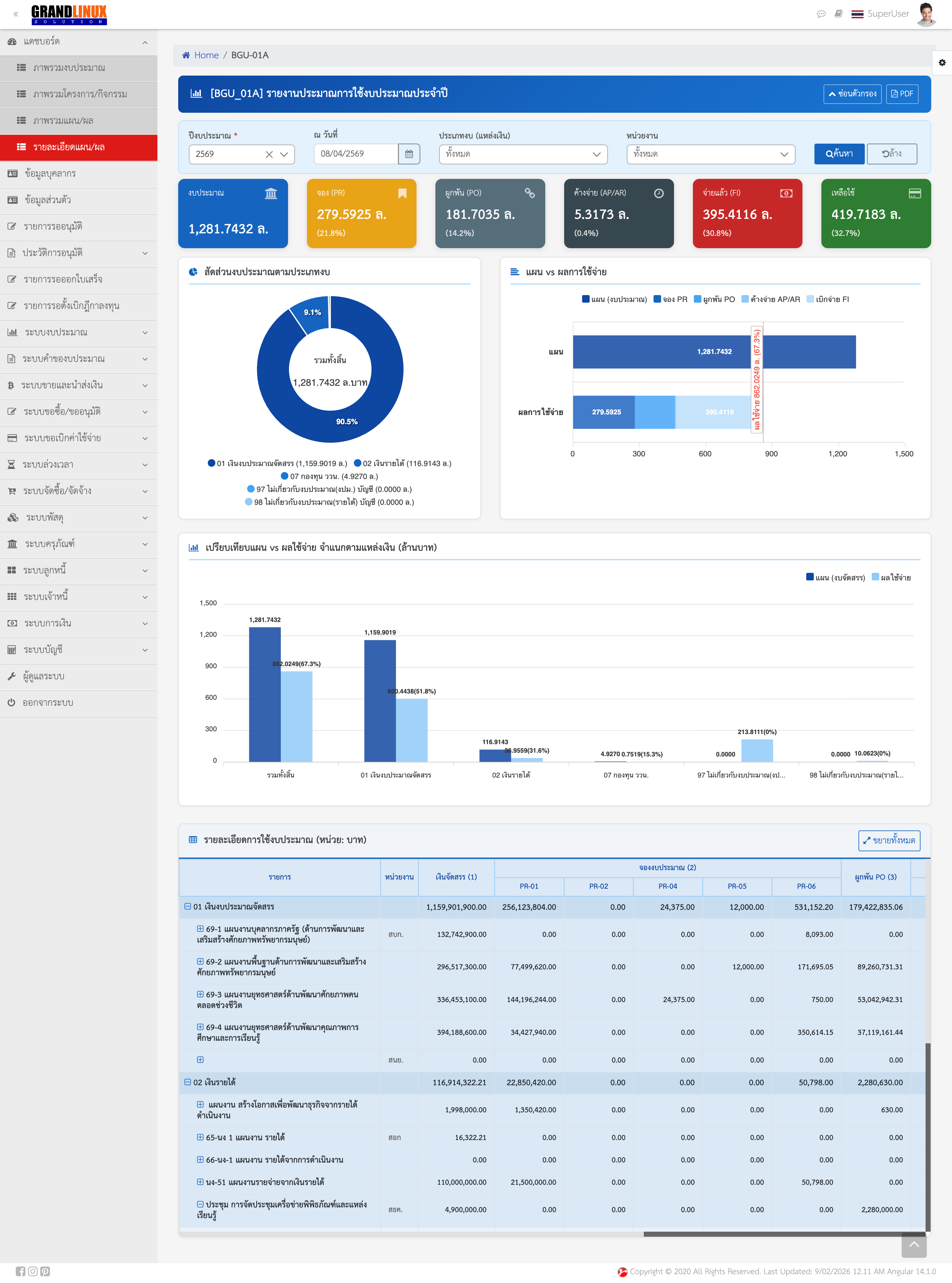
Saeree ERP Budget Dashboard — displaying all 6 budget status fields in real-time
The Flow of Funds — From Plan to Paid
Budget fund movements don't happen in "lump sums" but as a step-by-step process where funds transition through stages as follows:
Budget Fund Flow
- Budget Setup (BG-01) — funds enter the "Plan" field in full. At this point, Available Balance = 100% of Plan
- Spending Approval (PR) — once a purchase request or approval-in-principle is approved, the system instantly "reserves" funds from the available balance. Funds move from "Available" to "Reserved" (nothing is posted to accounting yet)
- Purchase Order (PO) — once a PO is issued or a contract is signed with the vendor, funds move from "Reserved" to "Committed," meaning the organization now has an obligation to pay — but no liability is recorded yet, so nothing is posted to accounting
- Goods Receipt + Liability (IM + AP) — when goods/services pass inspection and the liability is recorded (invoice submitted for payment), funds move from "Committed" to "Pending Payment" — this is the point where the accounting entry is posted
- Payment (FI) — when the payment is processed and deducted from the bank account, funds move from "Pending Payment" to "Paid," completing the process
Across fiscal years: items still sitting in Reserved, Committed or Pending Payment on 30 September are encumbered automatically and can be drawn and disbursed in the next fiscal year without extra paperwork. Reserved items that will not proceed must be cancelled to release the funds. Details in the 30-day new fiscal year checklist.
With every step, the dashboard automatically updates all field values in real time. Executives don't need to ask anyone — just open the screen and see immediately.
Dashboard from 3 Perspectives
Users at each organizational level need to see different budget information, both in breadth and depth. A good dashboard must support all levels:
| User Level | What They See on the Dashboard | Benefits |
|---|---|---|
| Executives (Organization Overview) | Consolidated budget data across all funding sources and departments, with the ability to drill down into each unit's detailed budget | Strategic decision-making with the entire organization's overview on one screen |
| Department/Bureau Heads | Detailed budget data for their own department/bureau, with plan-vs-actual comparison | Manage departmental budget and control spending within limits |
| Staff Officers | See only the budget they are responsible for, based on system permissions | Work accurately, check balances before processing, and reduce errors |
This tiered visibility is not just about convenience but also about data security — staff should not see other departments' budgets, while executives must see all departments simultaneously.


Key Reports — Available Anytime, No Need to Wait for Month-End
Beyond the overview dashboard, a good budget system must have standard reports available on demand without requiring the finance department to prepare them. Key reports that should be available:
| Report | What It Shows |
|---|---|
| BGU-01 | Annual budget usage estimate — full-year overview of whether the budget will be sufficient |
| BGU-04 | Monthly plan-vs-actual budget comparison — shows which months overspent and which underspent |
| BGU-06 | Monthly/quarterly budget usage — report used for the State Audit Office (SAO) submissions |
| BGU-09 | Project expenditure summary — track budget by project and see how much each project has spent |
| MBG-01 | Budget status — the most frequently used report showing all 6 status fields (plan, reserved, committed, pending payment, paid, available) on one page |
These reports can be filtered by time period, department, funding source, and project, and can be instantly exported to Excel or PDF. This makes preparing documents for the State Audit Office or executive reports achievable in just a few clicks.
What the Dashboard Helps Prevent
A budget dashboard is not just a "pretty screen" — it is a problem prevention tool for issues organizations face repeatedly:
- Prevents overspending: The system checks the remaining balance before every approval — if the budget is insufficient, the system alerts immediately and blocks the transaction
- Prevents data inconsistencies: All departments view data from a single source (Single Source of Truth) — eliminating the problem of planning reporting one number and finance reporting another
- Prevents stalled funds: See exactly where funds are stuck and take targeted action — such as POs issued but goods not yet received, or liabilities recorded but not yet paid
- Prevents delayed reports: Pull reports anytime without waiting for finance to compile month-end summaries. Executives can view them on their own at any time
Real-World Scenarios — Without Dashboard vs. With Dashboard
To illustrate clearly, let's compare the same scenarios between an organization without a dashboard and one with it:
| Scenario | Without Dashboard | With Dashboard |
|---|---|---|
| Executive asks "How much budget remains?" | Must wait 1-3 days for finance to compile data | Open the screen, see it instantly |
| Approving a new PR | Unsure whether budget is sufficient — must call to ask | System checks automatically and alerts if insufficient |
| Transferring budget | Don't know if the source budget actually has funds (may already be reserved) | See actual remaining balance (after deducting reservations) before approval |
| Submitting SAO report | Must compile from multiple Excel files, taking several days | Pull the BGU-06 report with one click instantly |
| End of fiscal year | Closing takes weeks | Data is already ready — close faster |
A good budget is not just numbers on paper — it is data that moves constantly. Executives who see data in time are executives who make decisions at the right moment.
- Saeree ERP Team
Summary — Why Organizations Need a Budget Dashboard
- Real-time budget tracking without waiting for month-end — executives see budget status instantly upon opening the screen, no waiting for anyone's report
- See the big picture and details simultaneously — from the organization-wide view, click to drill down into each department or project instantly
- Prevent overspending — the system checks remaining balances before every approval, preventing unintentional budget overruns
- See funds at every stage — plan, reserved, committed, pending payment, paid, and available — all 6 statuses
- Complete reports ready for SAO submission — BGU-01, BGU-04, BGU-06, BGU-09, MBG-01 available anytime
If your organization still has to wait until month-end to know how much budget remains, or still uses Excel to compile budgets from multiple departments, you can schedule a demo of Saeree ERP's budget system or contact our consulting team to assess your organization's readiness.